> ## Documentation Index
> Fetch the complete documentation index at: https://docs.tess.im/llms.txt
> Use this file to discover all available pages before exploring further.
# Addons
Addons are extra features that you can enable in your account to expand Tess’s capabilities. They work like “extensions” that enhance your chat experience — from smarter searches to expanded context windows. Enable only what you need and customize your platform according to your workflow.
### **What are Addons?**
Addons are optional modules available in your Tess account. Each addon enables a specific behavior that is not available in the platform’s default experience.
Unlike Tools (features activated during chat), Addons act in a more structural way — some impact how files are indexed, others how the model processes context, and others how you interact with agents and control the creativity of responses.
### Where to find
Access Addons through the settings menu after clicking on your user icon:
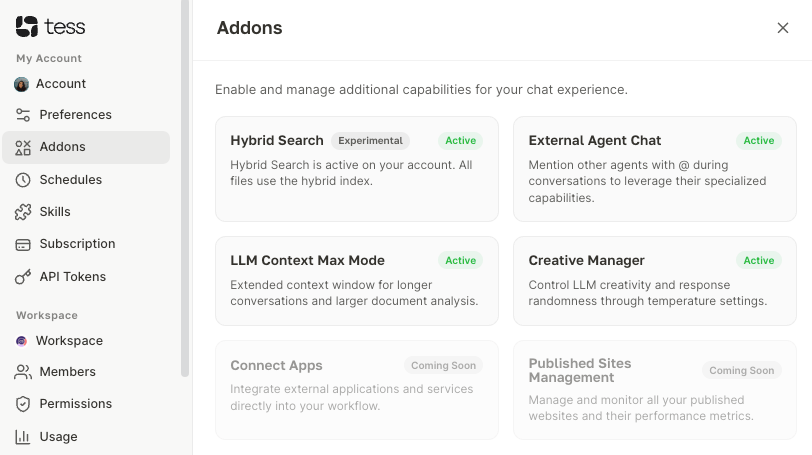 ### What Addons are available
Enables a hybrid search index across all your files. It combines semantic search (by meaning) with lexical search (by keywords), making document information retrieval more precise.
Ideal for: Users who work with large volumes of files and need more accurate answers based on documents.
When enabled, all account files automatically use the hybrid index.
Allows you to mention other agents during a conversation using the @ symbol. This way, you can trigger the specialized capabilities of different agents without leaving the current chat context.
Ideal for: Workflows involving multiple agents with distinct roles (e.g., a research agent + a copywriting agent).
During chat, type @ followed by the name of the agent you want to trigger.
Extends the language model’s context window, allowing longer conversations and analysis of larger documents without losing information throughout the history.
Ideal for: Analyzing long contracts, lengthy reports, or conversations with many chained steps.
Larger context windows may impact credit consumption when Max Mode is enabled.
Allows you to control the model’s temperature — that is, the level of creativity and randomness in generated responses.
Low temperature: More precise, consistent, and objective responses.
High temperature: More creative, varied, and exploratory responses.
Ideal for: Advanced users who switch between analytical tasks (low temperature) and creative tasks such as copywriting or brainstorming (high temperature).
Addons are the most direct way to adapt Tess to your work style. With just a few clicks, you expand what the platform can do — whether it’s retrieving information more accurately, writing more creatively, or integrating multiple agents into a single conversation. Explore what’s available and keep an eye on what’s coming next.
### What Addons are available
Enables a hybrid search index across all your files. It combines semantic search (by meaning) with lexical search (by keywords), making document information retrieval more precise.
Ideal for: Users who work with large volumes of files and need more accurate answers based on documents.
When enabled, all account files automatically use the hybrid index.
Allows you to mention other agents during a conversation using the @ symbol. This way, you can trigger the specialized capabilities of different agents without leaving the current chat context.
Ideal for: Workflows involving multiple agents with distinct roles (e.g., a research agent + a copywriting agent).
During chat, type @ followed by the name of the agent you want to trigger.
Extends the language model’s context window, allowing longer conversations and analysis of larger documents without losing information throughout the history.
Ideal for: Analyzing long contracts, lengthy reports, or conversations with many chained steps.
Larger context windows may impact credit consumption when Max Mode is enabled.
Allows you to control the model’s temperature — that is, the level of creativity and randomness in generated responses.
Low temperature: More precise, consistent, and objective responses.
High temperature: More creative, varied, and exploratory responses.
Ideal for: Advanced users who switch between analytical tasks (low temperature) and creative tasks such as copywriting or brainstorming (high temperature).
Addons are the most direct way to adapt Tess to your work style. With just a few clicks, you expand what the platform can do — whether it’s retrieving information more accurately, writing more creatively, or integrating multiple agents into a single conversation. Explore what’s available and keep an eye on what’s coming next.