> ## Documentation Index
> Fetch the complete documentation index at: https://docs.tess.im/llms.txt
> Use this file to discover all available pages before exploring further.
# Advanced Settings
This is the advanced control of the agent's behavior. Here in the advanced settings is where you can pre-define the AI model, tools, temperature, and other parameters to ensure predictable responses aligned with your use case.
### **Where to find it?**
The Advanced Settings section is on the agent's settings screen and brings together the advanced configurations, where you pre-define:
* which LLM it should use (or whether it can use more than one)
* which tools (Tools) it should trigger as a rule
* which temperature range/response style will be used
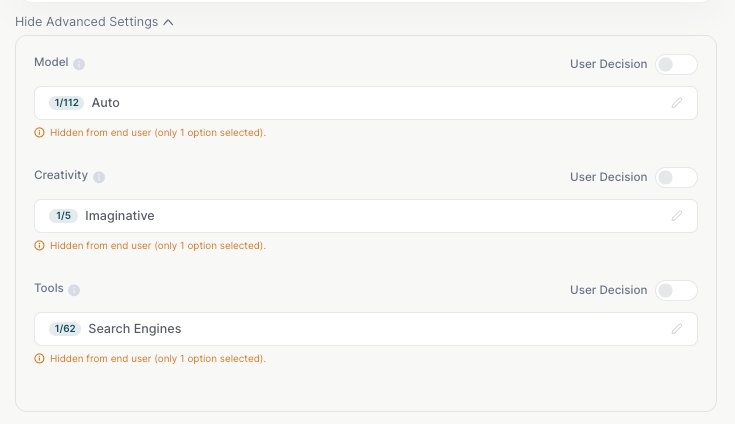
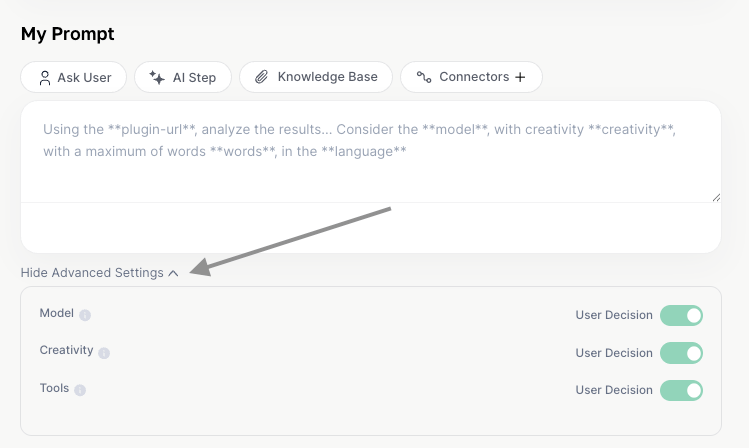 Instead of relying solely on choices made in the chat and by the user, you define these parameters directly in the agent, within Agent Studio. They will only be changed if the agent is changed:
 ### **Why it matters**
Less creative and more analytical agents, for example in financial, legal, or compliance areas, need less "creativity" and more control.
You limit which tools the agent can call (e.g., allow or block Internet, integrations, etc.).
Everyone who uses that agent will have the same behavior, regardless of who is in the chat. A perfect feature for creating agents that will be used by many people.
### **What does it influence?**
If you choose a specific model for the agent's operation, the end user won't be able to switch it, and all interaction will be done with that defined model. For this reason, we disable the user's choice and lock in this model.
This process can be done when a specific model has been identified as the best performer for the agent's activity, and to avoid changes and inconsistent deliveries, you can set it and everyone who uses the agent will also be interacting with the same model.
In general, temperature can influence the LLM's creativity. So if your agent leans more toward financial or legal use, for example, you can opt for a lower temperature, keeping creativity controlled.
If your agent leans toward a more creative bias, such as in marketing, brainstorming, or content areas, you can opt for a higher temperature, allowing more creative freedom from the LLMs.
If your agent is specific and exclusive for analyses, you can leave Deep Analysis active, for example. But remember, when you define a tool, no other will be activated during the conversation.
If the agent is for generating images and you've found that Nano Banana is the best at that function (based on tests and prompt specifications), by setting it as the default, every time an image is generated it will use Nano Banana.
You can combine all three settings, or choose just one to standardize!
If it's an agent for your team, remember to document internally the explanations of these settings so the team understands the reasoning.
### **Why it matters**
Less creative and more analytical agents, for example in financial, legal, or compliance areas, need less "creativity" and more control.
You limit which tools the agent can call (e.g., allow or block Internet, integrations, etc.).
Everyone who uses that agent will have the same behavior, regardless of who is in the chat. A perfect feature for creating agents that will be used by many people.
### **What does it influence?**
If you choose a specific model for the agent's operation, the end user won't be able to switch it, and all interaction will be done with that defined model. For this reason, we disable the user's choice and lock in this model.
This process can be done when a specific model has been identified as the best performer for the agent's activity, and to avoid changes and inconsistent deliveries, you can set it and everyone who uses the agent will also be interacting with the same model.
In general, temperature can influence the LLM's creativity. So if your agent leans more toward financial or legal use, for example, you can opt for a lower temperature, keeping creativity controlled.
If your agent leans toward a more creative bias, such as in marketing, brainstorming, or content areas, you can opt for a higher temperature, allowing more creative freedom from the LLMs.
If your agent is specific and exclusive for analyses, you can leave Deep Analysis active, for example. But remember, when you define a tool, no other will be activated during the conversation.
If the agent is for generating images and you've found that Nano Banana is the best at that function (based on tests and prompt specifications), by setting it as the default, every time an image is generated it will use Nano Banana.
You can combine all three settings, or choose just one to standardize!
If it's an agent for your team, remember to document internally the explanations of these settings so the team understands the reasoning.