> ## Documentation Index
> Fetch the complete documentation index at: https://docs.tess.im/llms.txt
> Use this file to discover all available pages before exploring further.
# Affiliates
The Tess AI Affiliate Program is your opportunity to share our platform with your network and be rewarded for it. If you believe in the potential of Tess AI, this program was made for you to become one of our ambassadors.
### **How does the Affiliate Program work?**
The model is simple and beneficial for everyone. For every referral you make that converts into a new customer, everyone wins.
\
The person who subscribes to Tess AI using your exclusive affiliate link gets a 10% discount at the time of purchase, applied to the plan they choose.
\
You receive a 10% commission on the amount your referral pays during the first 12 months of their subscription.
### **Important Commission Details**
\
The 10% commission is recurring on payments made by the customer during the first 12 months of the contract.
\
There is currently a total commission cap of up to \$1,000 (one thousand dollars) per customer you refer.
### **Practical Example of Earning Potential**
Imagine you referred Tess AI to a company, and they purchased a plan with 10 licenses (seats) at a cost of \$40 per license/month.
> *Annual contract value: 10 seats x \$40 x 12 months = \$4,800*
>
> *Your commission (10%): \$480*
>
> With a single referral, you would earn \$480.
### **How to Join: Step-by-Step Guide**
To generate your link and start referring, the process is very quick:
Make sure you’re logged into the account you want to generate the link from.
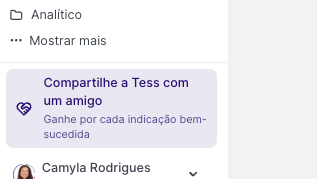
Click the "Share Tess with a Friend” button (in the side menu) or, after clicking your user icon, look for the "Earn up to \$1000" option.
 On the program page, click the button to copy your exclusive invitation link.
Share your link! You can send it directly to your contacts or use the quick share buttons for social networks like LinkedIn, WhatsApp, and email.
### **Tracking Your Results and Payments**
You have full transparency to track the performance of your referrals.
Within the same affiliate program page, click the "Rewards" tab or your dashboard. There, you’ll be able to see the status of your referrals and your accumulated earnings.
It’s important to note that a new sale can take, on average, 20 days to appear in your dashboard. This period is necessary to complete all financial and confirmation steps.
Payments are made via PayPal. To receive them, just add your PayPal account in the program’s payment settings area. If you don’t have an account yet, you can create one for free on the PayPal website.
**Troubleshooting: Payment with "Returned" status**
Occasionally, a commission payment may not be completed and may appear with the status **"Returned."**
This means the payment was correctly processed by our payments partner (Cello), but it was returned by PayPal due to an issue with the affiliate’s own account.
The most common reasons for this to happen are:
* The PayPal account email registered on the affiliate platform is incorrect or doesn’t exist.
* The PayPal account hasn’t been fully verified.
* There is a restriction or block on the PayPal account that prevents receiving funds.
> **How to fix it**
>
> * Review your details: Make sure the PayPal email registered in the affiliate dashboard is correct.
> * Check your PayPal account: Log in to your PayPal account and confirm there are no pending verification steps or account restrictions. If you have questions, contact PayPal support.
> * Update the information: After fixing any pending issue, update or re-enter your payment email in the affiliate dashboard. A new payment attempt will be made automatically in the next cycle.
If you prefer, you can also contact our payments partner’s support directly by email: [support@cello.so](mailto:support@cello.so).
Or, if you have any questions about the Affiliate Program, our team is available to help by email: [support@tess.im](mailto:support@tess.im).
On the program page, click the button to copy your exclusive invitation link.
Share your link! You can send it directly to your contacts or use the quick share buttons for social networks like LinkedIn, WhatsApp, and email.
### **Tracking Your Results and Payments**
You have full transparency to track the performance of your referrals.
Within the same affiliate program page, click the "Rewards" tab or your dashboard. There, you’ll be able to see the status of your referrals and your accumulated earnings.
It’s important to note that a new sale can take, on average, 20 days to appear in your dashboard. This period is necessary to complete all financial and confirmation steps.
Payments are made via PayPal. To receive them, just add your PayPal account in the program’s payment settings area. If you don’t have an account yet, you can create one for free on the PayPal website.
**Troubleshooting: Payment with "Returned" status**
Occasionally, a commission payment may not be completed and may appear with the status **"Returned."**
This means the payment was correctly processed by our payments partner (Cello), but it was returned by PayPal due to an issue with the affiliate’s own account.
The most common reasons for this to happen are:
* The PayPal account email registered on the affiliate platform is incorrect or doesn’t exist.
* The PayPal account hasn’t been fully verified.
* There is a restriction or block on the PayPal account that prevents receiving funds.
> **How to fix it**
>
> * Review your details: Make sure the PayPal email registered in the affiliate dashboard is correct.
> * Check your PayPal account: Log in to your PayPal account and confirm there are no pending verification steps or account restrictions. If you have questions, contact PayPal support.
> * Update the information: After fixing any pending issue, update or re-enter your payment email in the affiliate dashboard. A new payment attempt will be made automatically in the next cycle.
If you prefer, you can also contact our payments partner’s support directly by email: [support@cello.so](mailto:support@cello.so).
Or, if you have any questions about the Affiliate Program, our team is available to help by email: [support@tess.im](mailto:support@tess.im).