> ## Documentation Index
> Fetch the complete documentation index at: https://docs.tess.im/llms.txt
> Use this file to discover all available pages before exploring further.
# AI Step | App Integration
Your agents in Tess can do much more than just process information — they can act. App Integration Steps (App Integration) are the feature that connects your agents to external systems, allowing them to perform tasks in the real world or collect information from other platforms.
This guide explains the logic behind this powerful block of steps, showing how you can give "arms and legs" to your agents so they become active participants in your workflows.
### **The Step Logic: Get Information vs. Execute Action**
To understand App Integration, it’s helpful to contrast it with other types of steps.
They are designed to COLLECT INFORMATION and bring it into the agent so it can analyze it.
They are designed to EXECUTE ACTIONS outside the agent, using the information it already has.
It’s the difference between an agent that reads a sales report and an agent that updates a customer’s status in your CRM.
### **How It Works in Practice**
Configuring an integration follows a simple logical flow in AI Studio:
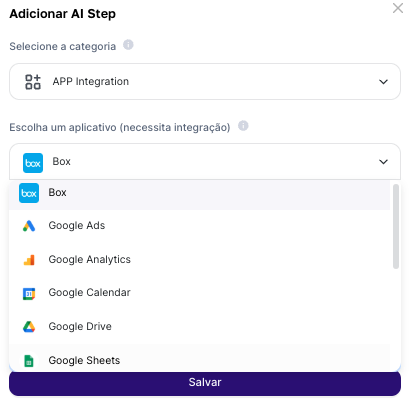
* Add a Step: In your agent, add a new App Integration step.
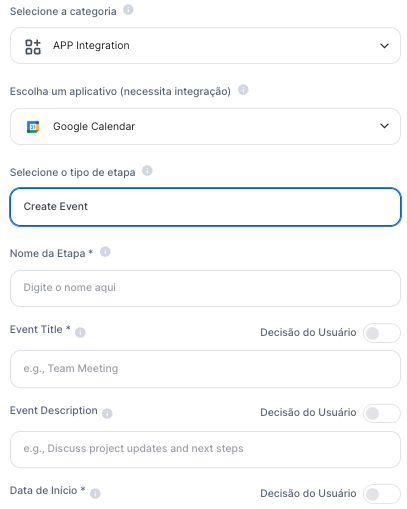
* Choose the App and the Action: Select the app you want to connect (e.g., Google Calendar) and the specific action the agent should perform (e.g., "Create Event").
* Map the Information: Configure the action fields (such as "Event Title" or "Guest Email"), filling them with the corresponding variables from your User Inputs.
 The crucial point is that the agent does not execute this action randomly. Your **prompt** serves as the brain of the operation, defining the rules for these steps to happen at the beginning of the chat (chat agent) or before the final result (text agent).
### **Quick Example: Qualification and Scheduling**
Imagine an automated win and scheduling process, where a customer lands in your internal communication platform (e.g., Slack), notifying the support team about the new sale. This will be a trigger to activate Tess and fill in the information in the Google Calendar step, with name, email, and demo details through the Integration Step.
The agent then takes the variables collected in Slack and uses them to fill in and execute the "Create Event" action in Google Calendar, sending the invite automatically.
The crucial point is that the agent does not execute this action randomly. Your **prompt** serves as the brain of the operation, defining the rules for these steps to happen at the beginning of the chat (chat agent) or before the final result (text agent).
### **Quick Example: Qualification and Scheduling**
Imagine an automated win and scheduling process, where a customer lands in your internal communication platform (e.g., Slack), notifying the support team about the new sale. This will be a trigger to activate Tess and fill in the information in the Google Calendar step, with name, email, and demo details through the Integration Step.
The agent then takes the variables collected in Slack and uses them to fill in and execute the "Create Event" action in Google Calendar, sending the invite automatically.
 In this case, the Slack message was the trigger, and the Integration Step was the action tool.
NOTE\
\
For all of this to happen, you’ll need to integrate this app with your access in Tess. This will be the security mechanism so the process can be carried out and the tool triggered.
### **Expanding the Possibilities**
The applications are vast and allow you to automate countless processes:
* Update a Google Sheets spreadsheet
* Collect information from Google or Meta campaigns
* Upload a file to Drive or Box
App Integration Steps transform your agent from an informational assistant into a proactive, functional member of your team.
By mastering the logic of connecting your agent’s intelligence with the tools that power your business, you can automate processes, increase efficiency, and create truly integrated solutions.
In this case, the Slack message was the trigger, and the Integration Step was the action tool.
NOTE\
\
For all of this to happen, you’ll need to integrate this app with your access in Tess. This will be the security mechanism so the process can be carried out and the tool triggered.
### **Expanding the Possibilities**
The applications are vast and allow you to automate countless processes:
* Update a Google Sheets spreadsheet
* Collect information from Google or Meta campaigns
* Upload a file to Drive or Box
App Integration Steps transform your agent from an informational assistant into a proactive, functional member of your team.
By mastering the logic of connecting your agent’s intelligence with the tools that power your business, you can automate processes, increase efficiency, and create truly integrated solutions.