> ## Documentation Index
> Fetch the complete documentation index at: https://docs.tess.im/llms.txt
> Use this file to discover all available pages before exploring further.
# Artifacts
Artifacts are pages published directly from Tess. They allow you to transform content generated in chats — such as guides, analyses, landing pages, or documentation — into shareable links, ready for external access. It’s the fastest way to move beyond the “chat” and put something live.
### **What are they?**
Artifacts are published outputs from Tess with their own hosting.
In practice, any structured content on the platform can be turned into a public link. This eliminates the need to export text to other publishing tools (such as a CMS or website builder). They act as a bridge between your creation environment (AI) and the final delivery to clients or your team.
### **Where to find them?**
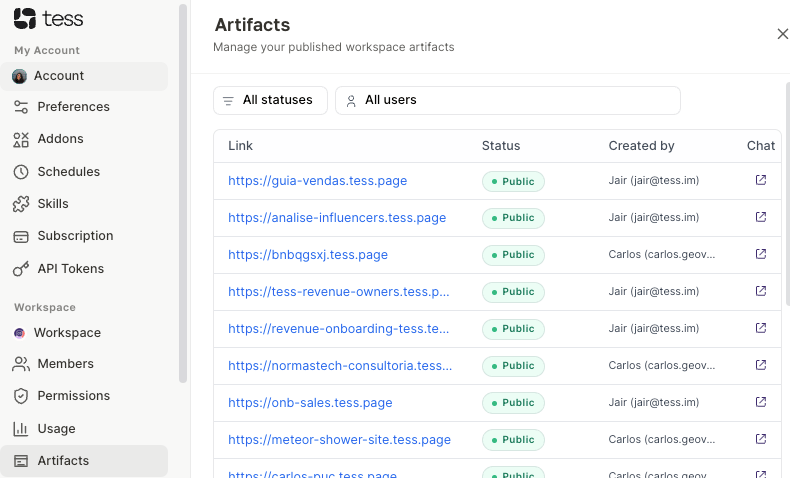
Access Artifacts through the settings menu after clicking on your user icon:
 ### **How to use them?**
1. Generate the content: In the Tess AI chat, ask it to create a page, guide, or analysis.
2. Turn it into an Artifact: Ask the AI to structure the final format (e.g., "turn this into a page for publication") and use the publishing feature in the chat.
3. Access management: Go to the sidebar → Workspace → Artifacts.
4. Copy and share: Click on the generated link (format `tess.page`) and send it to whoever needs it.
5. Control publication: If you need to take the page offline, simply click on the green status label Public. It will unpublish the artifact instantly. To publish it again, click the same button.
### **Deeper explanation**
Artifacts work as a simplified deployment layer within Tess.
Instead of:
* Exporting content
* Uploading it to a CMS
* Configuring hosting
You publish directly from the AI.
Each artifact:
* Is linked to a source chat
* Can be reopened and iterated
* Maintains a stable link (ideal for sharing)
This makes the cycle create → adjust → publish → share extremely fast.
### Practical examples
#### 1. Create a simple landing page
> Prompt:\
> "Create a landing page for a SaaS CRM product for small businesses. Structure it with a headline, benefits, social proof, and CTA."
>
> Then:\
> "Turn this into a publishable page"
#### 2. Share an analysis with a client
> Prompt:\
> "Analyze this sales data and generate an executive report with insights and recommendations"
>
> Then:\
> "Format this as a clear page to share with a client"
Best practices
* Structure before publishing\
Ask the AI to organize the content with titles, sections, and clear hierarchy.
* Review the final content\
Once published, the link can be accessed by anyone.
* Use for fast deliverables\
Ideal for materials that need to be shared without friction.
* Standardize publishing prompts\
Example: “format as a clean page, with well-defined sections and ready for publication”.
* Leverage the chat connection\
If you need to change something, go back to the original chat and generate a new version.
### Important notes
* Published artifacts are accessible via a public link, so avoid including sensitive or confidential data.
* The default domain is `tess.page`
Artifacts transform Tess into a delivery tool, not just a creation tool. In just a few steps, you go from a prompt to a shareable link — ideal for those who need to produce and distribute content quickly.
### **How to use them?**
1. Generate the content: In the Tess AI chat, ask it to create a page, guide, or analysis.
2. Turn it into an Artifact: Ask the AI to structure the final format (e.g., "turn this into a page for publication") and use the publishing feature in the chat.
3. Access management: Go to the sidebar → Workspace → Artifacts.
4. Copy and share: Click on the generated link (format `tess.page`) and send it to whoever needs it.
5. Control publication: If you need to take the page offline, simply click on the green status label Public. It will unpublish the artifact instantly. To publish it again, click the same button.
### **Deeper explanation**
Artifacts work as a simplified deployment layer within Tess.
Instead of:
* Exporting content
* Uploading it to a CMS
* Configuring hosting
You publish directly from the AI.
Each artifact:
* Is linked to a source chat
* Can be reopened and iterated
* Maintains a stable link (ideal for sharing)
This makes the cycle create → adjust → publish → share extremely fast.
### Practical examples
#### 1. Create a simple landing page
> Prompt:\
> "Create a landing page for a SaaS CRM product for small businesses. Structure it with a headline, benefits, social proof, and CTA."
>
> Then:\
> "Turn this into a publishable page"
#### 2. Share an analysis with a client
> Prompt:\
> "Analyze this sales data and generate an executive report with insights and recommendations"
>
> Then:\
> "Format this as a clear page to share with a client"
Best practices
* Structure before publishing\
Ask the AI to organize the content with titles, sections, and clear hierarchy.
* Review the final content\
Once published, the link can be accessed by anyone.
* Use for fast deliverables\
Ideal for materials that need to be shared without friction.
* Standardize publishing prompts\
Example: “format as a clean page, with well-defined sections and ready for publication”.
* Leverage the chat connection\
If you need to change something, go back to the original chat and generate a new version.
### Important notes
* Published artifacts are accessible via a public link, so avoid including sensitive or confidential data.
* The default domain is `tess.page`
Artifacts transform Tess into a delivery tool, not just a creation tool. In just a few steps, you go from a prompt to a shareable link — ideal for those who need to produce and distribute content quickly.