> ## Documentation Index
> Fetch the complete documentation index at: https://docs.tess.im/llms.txt
> Use this file to discover all available pages before exploring further.
# Memories
Tess Memories allow you to save, organize, and reuse important information in the form of collections. They work as "knowledge folders" that you activate before each conversation, ensuring the AI responds with context, consistency, and alignment with your work or your team's work.
### **What is it?**
A Memory Collection is a set of structured information (texts, instructions, data, or rules) that you provide to the AI before starting a conversation.
In practice:
* You write memories (e.g.: client context, tone of voice, internal rules)
* Organize them into thematic collections
* Activate these collections in the chat
* The AI automatically takes this content into account in its responses
Think of it as a "reusable context package" that you hand over to the agent before each task.
Tess Memories allow you to save, organize, and reuse important information in the form of collections. They work as "knowledge folders" that you activate before each conversation, ensuring the AI responds with context, consistency, and alignment with your work or your team's work.
### **What is it?**
A Memory Collection is a set of structured information (texts, instructions, data, or rules) that you provide to the AI before starting a conversation.
In practice:
* You write memories (e.g.: client context, tone of voice, internal rules)
* Organize them into thematic collections
* Activate these collections in the chat
* The AI automatically takes this content into account in its responses
Think of it as a "reusable context package" that you hand over to the agent before each task.
You can decide, at any time, which memory collections you want to keep active/inactive for each job. It is fully modular. These memories can be used in new conversations, without the user needing to repeat everything every time.
## Why is it important?
* **Real personalization:** Tess responds taking history (memory) into account, not just the current message.
* **Less repetition:** The user does not need to provide the same data at each interaction.
* **Context for the team:** Organized memories help both the AI and the human team maintain the same level of service, even when agents change.
* **Work organization:** you can organize your memories by team, by project, by client, or however you prefer, to bring versatility to your way of working with AI.
## Configuring and Managing Memories
* Open the Chat screen
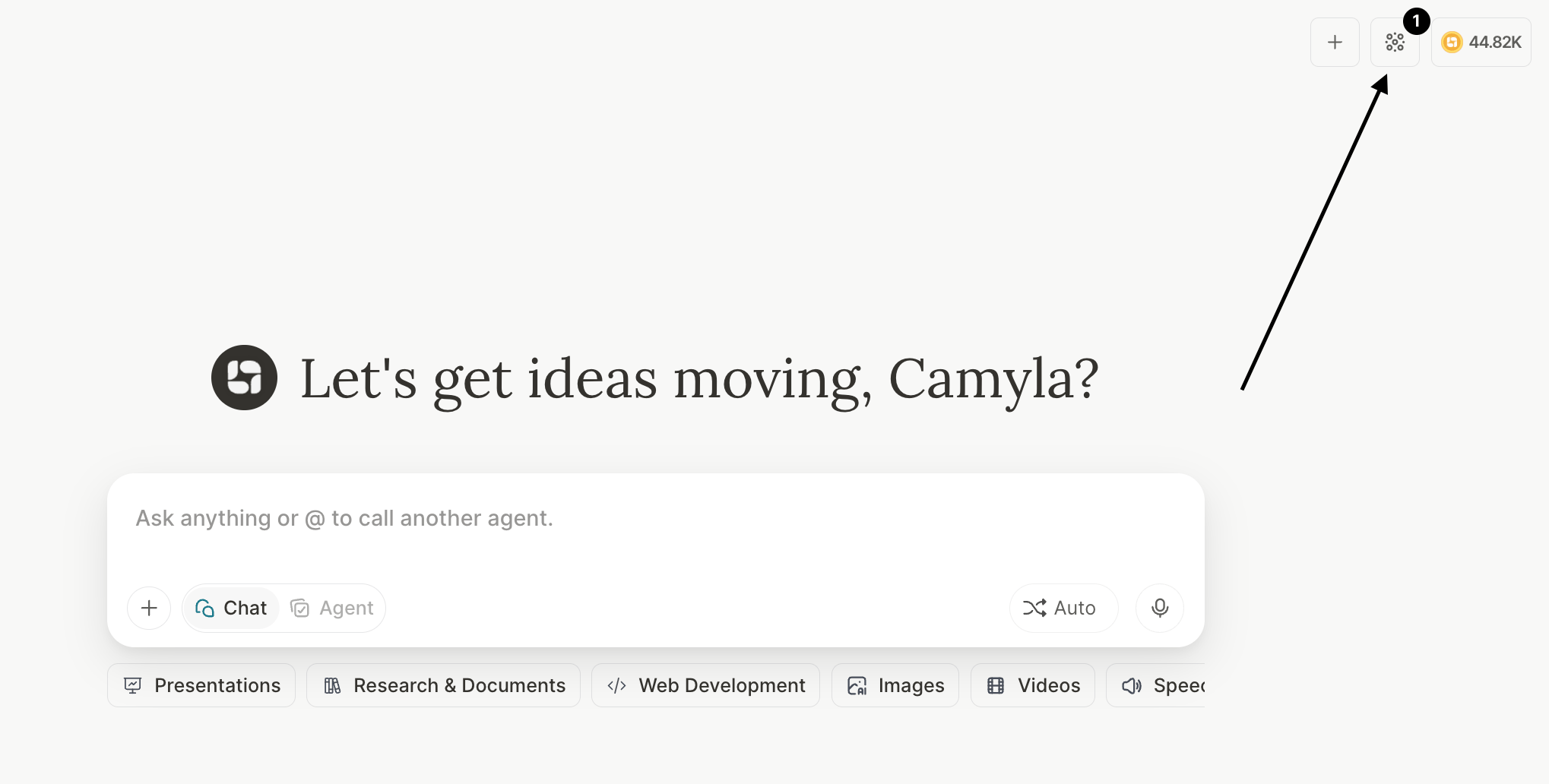
* Locate the Memory Collections icon in the upper right corner\\
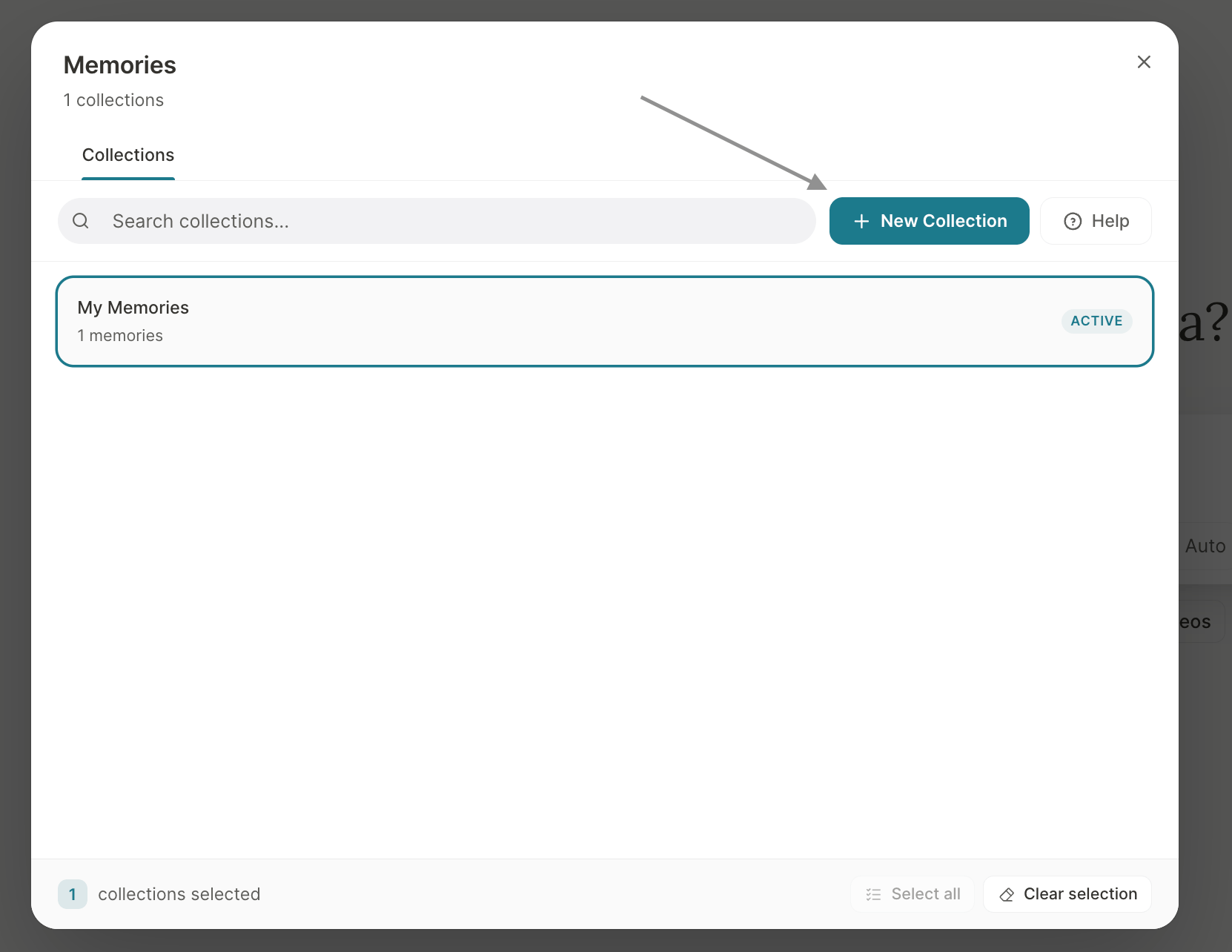
 * Select an existing collection or create a new one, according to your needs\\
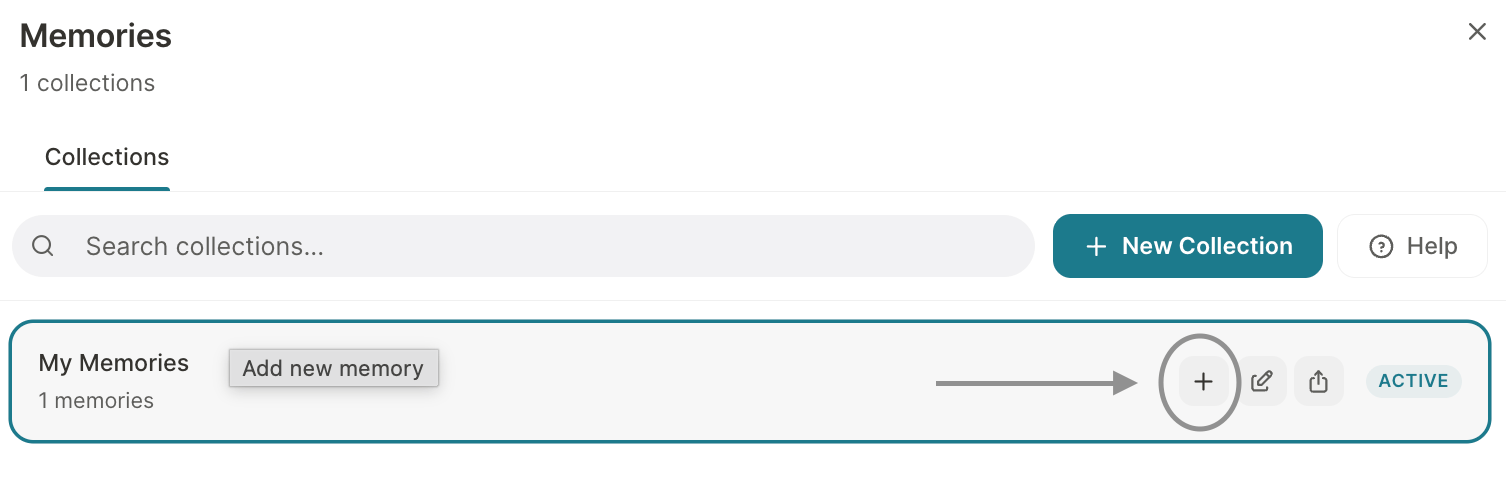
 * Create memories and a collection\\
 * Remember to activate the collection — a number will appear on the icon and active collections will be marked
In the Memories icon, you can:
* Activate or deactivate memory collections
* Create new collections segmented by use case
* Review, edit, or remove existing memories
After activating a collection, you can start or continue the conversation normally in the chat. Notice whether the LLM is using the memory information to complement responses (when it makes sense).
### **Collection Sharing**
Tess offers 4 sharing options, with different levels of control:
*Only you access and edit*
When you create a collection without sharing, it is entirely yours. Ideal for personal contexts, your own methodologies, or confidential information.
*Anyone with the link imports a copy*
Generate a public link. Whoever accesses it can import a full copy to their own account. Each person has their own independent version after importing.
*Live access — permanent connection*
All members have real-time access. Any update by the owner appears immediately for everyone in the next chat. Define who can read and who can edit.
*The entire company has access*
Ideal for knowledge that everyone should have: brand values, product manual, internal glossary. The admin controls the permissions.
### Sharing management
The sharing flow has been improved with more control and clarity:
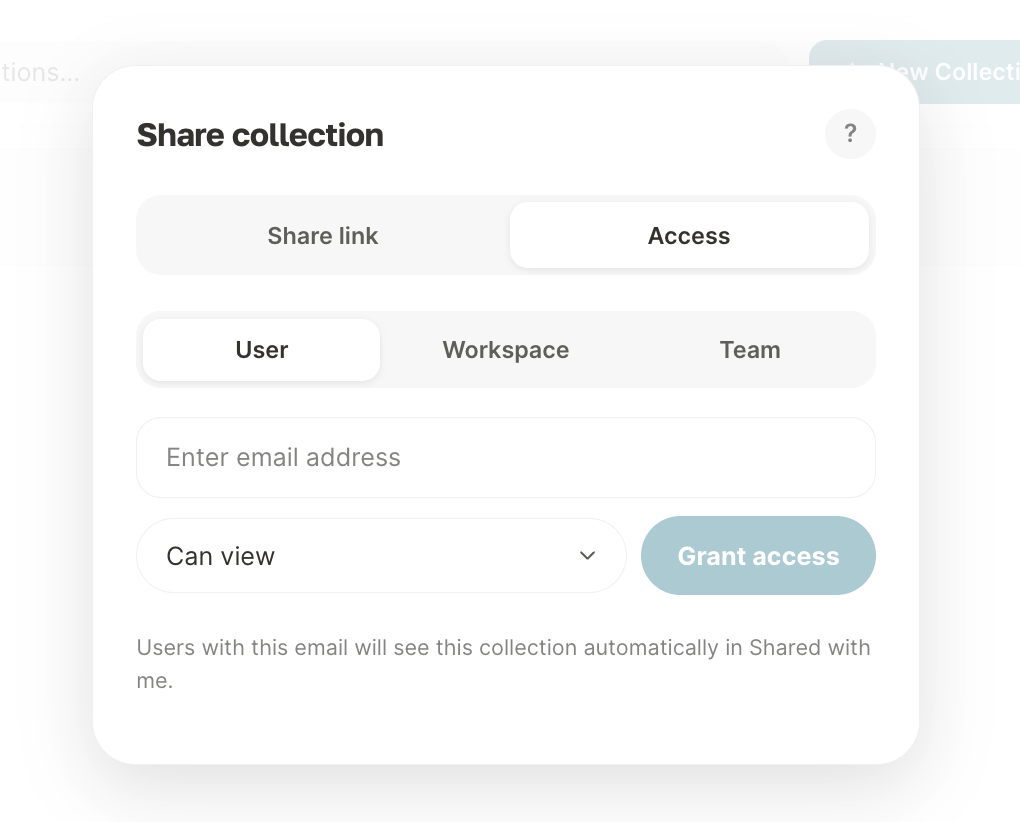
* Organized management modal to view access
* Granular permissions (view or edit)
* Prevention of duplicate invitations
* Active link control
* Preservation of the origin of shared collections
To share, simply:
When you hover over the collection, the buttons will appear — just locate the share button and begin the settings:
* Remember to activate the collection — a number will appear on the icon and active collections will be marked
In the Memories icon, you can:
* Activate or deactivate memory collections
* Create new collections segmented by use case
* Review, edit, or remove existing memories
After activating a collection, you can start or continue the conversation normally in the chat. Notice whether the LLM is using the memory information to complement responses (when it makes sense).
### **Collection Sharing**
Tess offers 4 sharing options, with different levels of control:
*Only you access and edit*
When you create a collection without sharing, it is entirely yours. Ideal for personal contexts, your own methodologies, or confidential information.
*Anyone with the link imports a copy*
Generate a public link. Whoever accesses it can import a full copy to their own account. Each person has their own independent version after importing.
*Live access — permanent connection*
All members have real-time access. Any update by the owner appears immediately for everyone in the next chat. Define who can read and who can edit.
*The entire company has access*
Ideal for knowledge that everyone should have: brand values, product manual, internal glossary. The admin controls the permissions.
### Sharing management
The sharing flow has been improved with more control and clarity:
* Organized management modal to view access
* Granular permissions (view or edit)
* Prevention of duplicate invitations
* Active link control
* Preservation of the origin of shared collections
To share, simply:
When you hover over the collection, the buttons will appear — just locate the share button and begin the settings:
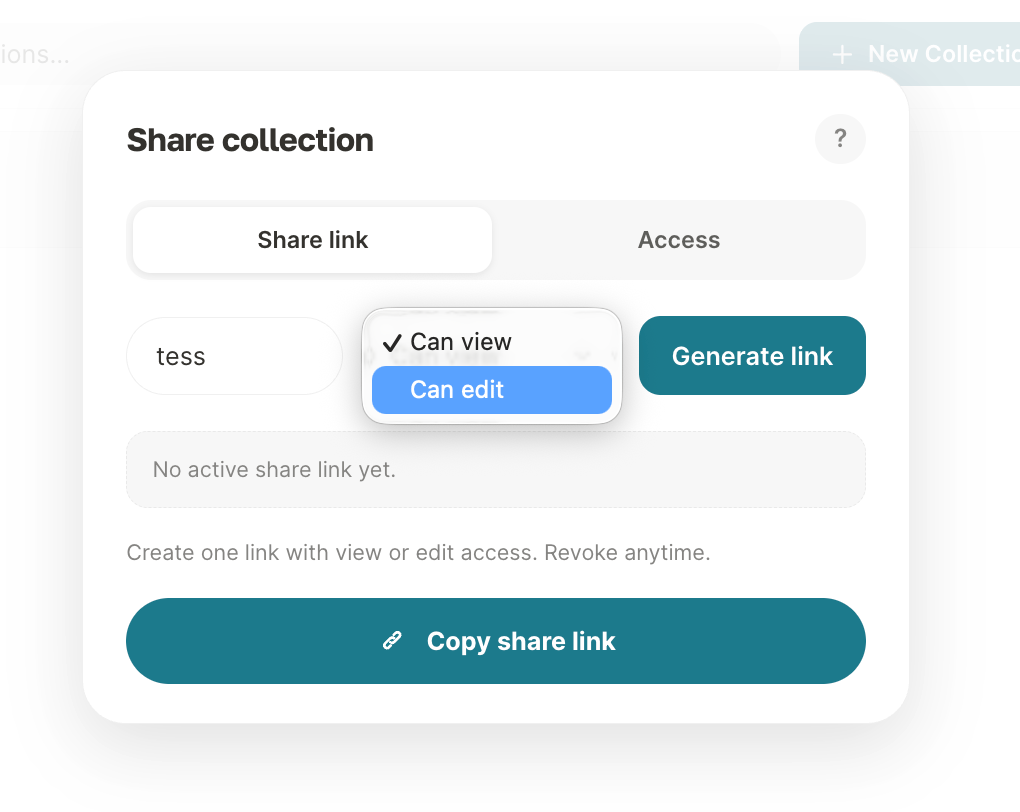
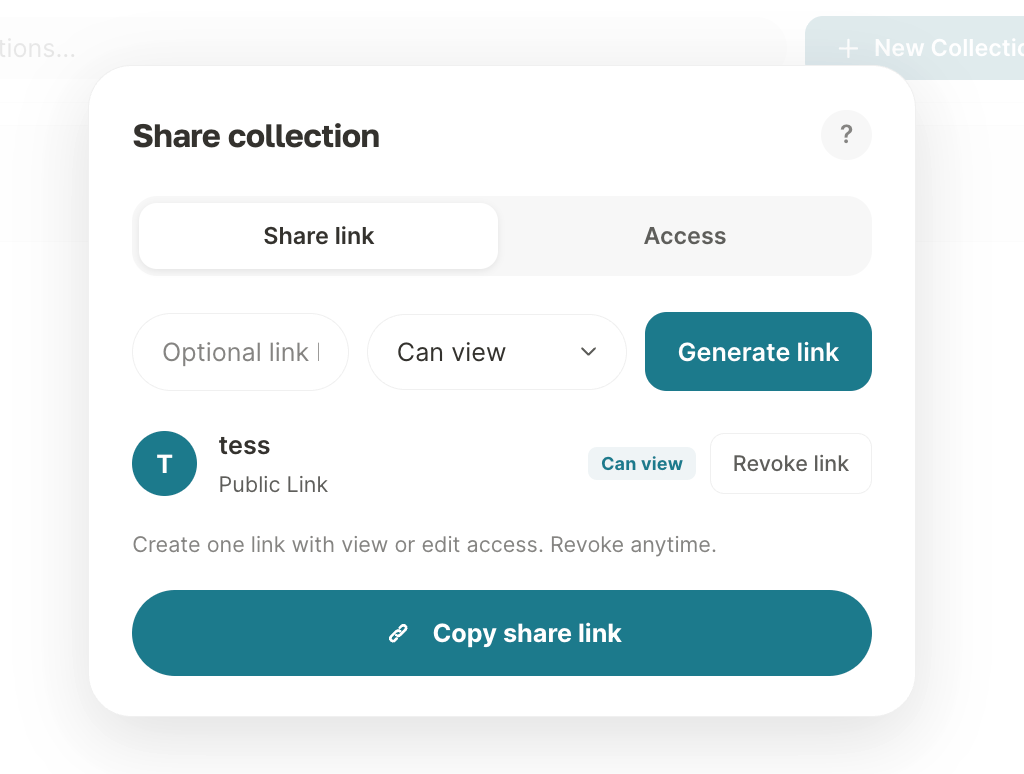
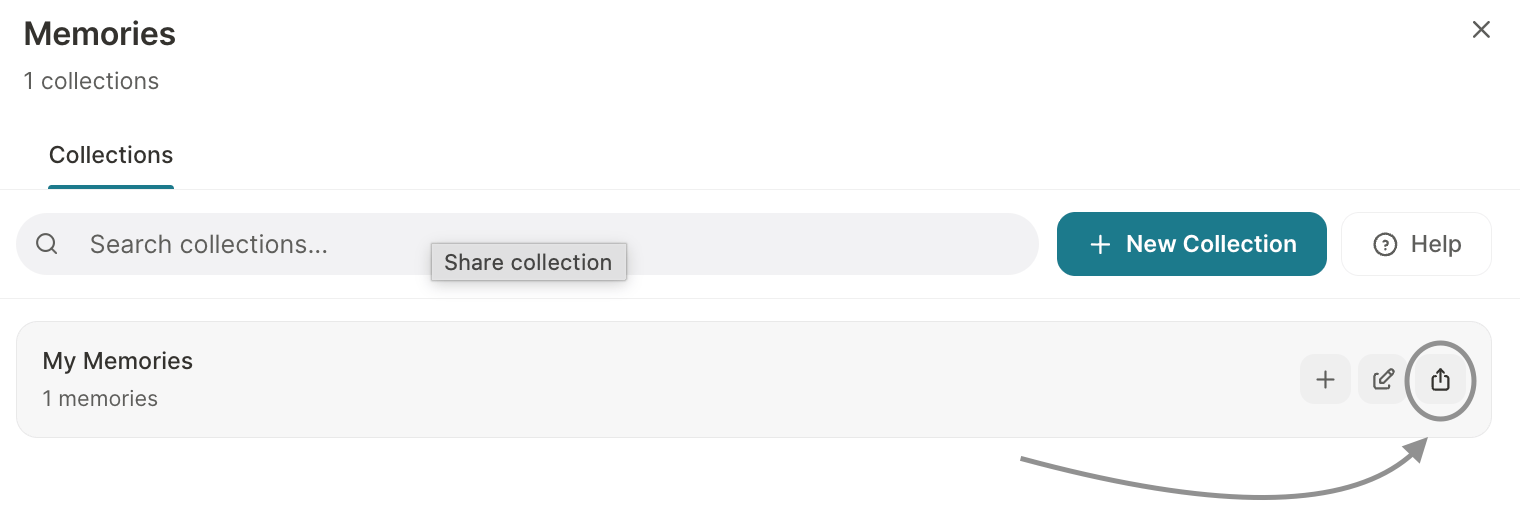 If you want to assign a prefix, that is possible, as well as choosing the permission level — view or edit. After configuring this, just generate your link.
 **Best Practices**
* Clearly define what type of information can become a memory — and what should never be saved (for example, sensitive data, passwords, information that violates privacy or compliance policies).
* Use different collections for different contexts (one for support, one for sales, one for internal projects).
* Periodically review memories and collections to remove anything outdated or irrelevant, keeping only what truly helps with personalization and service quality.
* Prefer shared collections to standardize teams.
### Important notes
* Active memories consume tokens (they are part of the context sent to the AI)
* The more active collections, the higher the potential cost
* Avoid storing: Passwords; Sensitive data; or Confidential information without access control
* Team/workspace sharing is synchronized in real time
Memories transform Tess into a truly contextual system. With well-structured collections and the new sharing model, you reduce repetition, increase consistency, and scale AI usage with much more control.
### **Collection Sharing**
Tess offers 4 sharing options, with different levels of control:
*Only you access and edit*
When you create a collection without sharing, it is entirely yours. Ideal for personal contexts, your own methodologies, or confidential information.
*Anyone with the link imports a copy*
Generate a public link. Whoever accesses it can import a full copy to their own account. Each person has their own independent version after importing.
*Live access — permanent connection*
All members have real-time access. Any update by the owner appears immediately for everyone in the next chat. Define who can read and who can edit.
*The entire company has access*
Ideal for knowledge that everyone should have: brand values, product manual, internal glossary. The admin controls the permissions.
### Sharing management
The sharing flow has been improved with more control and clarity:
* Organized management modal to view access
* Granular permissions (view or edit)
* Prevention of duplicate invitations
* Active link control
* Preservation of the origin of shared collections
To share, simply:
When you hover over the collection, the buttons will appear — just locate the share button and begin the settings:
If you want to assign a prefix, that is possible, as well as choosing the permission level — view or edit. After configuring this, just generate your link.
**Best Practices**
* Clearly define what type of information can become a memory — and what should never be saved (for example, sensitive data, passwords, information that violates privacy or compliance policies).
* Use different collections for different contexts (one for support, one for sales, one for internal projects).
* Periodically review memories and collections to remove anything outdated or irrelevant, keeping only what truly helps with personalization and service quality.
* Prefer shared collections to standardize teams.
### Important notes
* Active memories consume tokens (they are part of the context sent to the AI)
* The more active collections, the higher the potential cost
* Avoid storing: Passwords; Sensitive data; or Confidential information without access control
* Team/workspace sharing is synchronized in real time
Memories transform Tess into a truly contextual system. With well-structured collections and the new sharing model, you reduce repetition, increase consistency, and scale AI usage with much more control.
## Using Memories via API
Authenticated memory API calls must include `x-workspace-id` (**required as of 2026-09-01**). Until then, omitting it falls back to the selected workspace (deprecated). After the cutoff, missing header → **422**. See [API Overview](/en/api-overview).
You can manage memories and apply them to agent executions directly through the API. The full flow involves three steps:
### Step 1 — Create a memory collection
```bash theme={null}
curl --request POST \
--url 'https://api.tess.im/memory-collections' \
--header 'Authorization: Bearer YOUR_API_KEY' \
--header 'x-workspace-id: YOUR_WORKSPACE_ID' \
--header 'Content-Type: application/json' \
--data '{
"name": "Customer data",
"description": "Profile information and preferences"
}'
```
Save the `id` from the response — you will use it in the next steps.
### Step 2 — Create memories in the collection
Add each memory record by passing the `collection_id` obtained in the previous step:
```bash theme={null}
curl --request POST \
--url 'https://api.tess.im/memories' \
--header 'Authorization: Bearer YOUR_API_KEY' \
--header 'x-workspace-id: YOUR_WORKSPACE_ID' \
--header 'Content-Type: application/json' \
--data '{
"memory": "The customer prefers formal communication and works in the financial sector.",
"collection_id": 123
}'
```
The created memory goes through an embedding process (semantic indexing). The `embedding_status` field starts as `pending` and changes to `succeeded` when it is ready to be queried. Wait for `succeeded` status before executing the agent to ensure the memory is found.
### Step 3 — Execute the agent with memory collections
When executing the agent, pass the `memory_collections` parameter with the IDs of the collections you want to activate:
```bash theme={null}
curl --request POST \
--url 'https://api.tess.im/agents/YOUR_AGENT_ID/execute' \
--header 'Authorization: Bearer YOUR_API_KEY' \
--header 'x-workspace-id: YOUR_WORKSPACE_ID' \
--header 'Content-Type: application/json' \
--data '{
"memory_collections": [123],
"messages": [
{ "role": "user", "content": "How do you prefer me to communicate with you?" }
]
}'
```
**How memory injection works:** Tess uses semantic search (RAG) to automatically select the most relevant memories from the collection based on the conversation content. Only memories with high semantic similarity are injected into the agent context — you do not need to specify which memories to use, just which collection to activate.
**Best Practices**
* Clearly define what type of information can become a memory — and what should never be saved (for example, sensitive data, passwords, information that violates privacy or compliance policies).
* Use different collections for different contexts (one for support, one for sales, one for internal projects).
* Periodically review memories and collections to remove anything outdated or irrelevant, keeping only what truly helps with personalization and service quality.
* Prefer shared collections to standardize teams.
### Important notes
* Active memories consume tokens (they are part of the context sent to the AI)
* The more active collections, the higher the potential cost
* Avoid storing: Passwords; Sensitive data; or Confidential information without access control
* Team/workspace sharing is synchronized in real time
Memories transform Tess into a truly contextual system. With well-structured collections and the new sharing model, you reduce repetition, increase consistency, and scale AI usage with much more control.
### **Collection Sharing**
Tess offers 4 sharing options, with different levels of control:
*Only you access and edit*
When you create a collection without sharing, it is entirely yours. Ideal for personal contexts, your own methodologies, or confidential information.
*Anyone with the link imports a copy*
Generate a public link. Whoever accesses it can import a full copy to their own account. Each person has their own independent version after importing.
*Live access — permanent connection*
All members have real-time access. Any update by the owner appears immediately for everyone in the next chat. Define who can read and who can edit.
*The entire company has access*
Ideal for knowledge that everyone should have: brand values, product manual, internal glossary. The admin controls the permissions.
### Sharing management
The sharing flow has been improved with more control and clarity:
* Organized management modal to view access
* Granular permissions (view or edit)
* Prevention of duplicate invitations
* Active link control
* Preservation of the origin of shared collections
To share, simply:
When you hover over the collection, the buttons will appear — just locate the share button and begin the settings:
If you want to assign a prefix, that is possible, as well as choosing the permission level — view or edit. After configuring this, just generate your link.
**Best Practices**
* Clearly define what type of information can become a memory — and what should never be saved (for example, sensitive data, passwords, information that violates privacy or compliance policies).
* Use different collections for different contexts (one for support, one for sales, one for internal projects).
* Periodically review memories and collections to remove anything outdated or irrelevant, keeping only what truly helps with personalization and service quality.
* Prefer shared collections to standardize teams.
### Important notes
* Active memories consume tokens (they are part of the context sent to the AI)
* The more active collections, the higher the potential cost
* Avoid storing: Passwords; Sensitive data; or Confidential information without access control
* Team/workspace sharing is synchronized in real time
Memories transform Tess into a truly contextual system. With well-structured collections and the new sharing model, you reduce repetition, increase consistency, and scale AI usage with much more control.
## Using Memories via API
Authenticated memory API calls must include `x-workspace-id` (**required as of 2026-09-01**). Until then, omitting it falls back to the selected workspace (deprecated). After the cutoff, missing header → **422**. See [API Overview](/en/api-overview).
You can manage memories and apply them to agent executions directly through the API. The full flow involves three steps:
### Step 1 — Create a memory collection
```bash theme={null}
curl --request POST \
--url 'https://api.tess.im/memory-collections' \
--header 'Authorization: Bearer YOUR_API_KEY' \
--header 'x-workspace-id: YOUR_WORKSPACE_ID' \
--header 'Content-Type: application/json' \
--data '{
"name": "Customer data",
"description": "Profile information and preferences"
}'
```
Save the `id` from the response — you will use it in the next steps.
### Step 2 — Create memories in the collection
Add each memory record by passing the `collection_id` obtained in the previous step:
```bash theme={null}
curl --request POST \
--url 'https://api.tess.im/memories' \
--header 'Authorization: Bearer YOUR_API_KEY' \
--header 'x-workspace-id: YOUR_WORKSPACE_ID' \
--header 'Content-Type: application/json' \
--data '{
"memory": "The customer prefers formal communication and works in the financial sector.",
"collection_id": 123
}'
```
The created memory goes through an embedding process (semantic indexing). The `embedding_status` field starts as `pending` and changes to `succeeded` when it is ready to be queried. Wait for `succeeded` status before executing the agent to ensure the memory is found.
### Step 3 — Execute the agent with memory collections
When executing the agent, pass the `memory_collections` parameter with the IDs of the collections you want to activate:
```bash theme={null}
curl --request POST \
--url 'https://api.tess.im/agents/YOUR_AGENT_ID/execute' \
--header 'Authorization: Bearer YOUR_API_KEY' \
--header 'x-workspace-id: YOUR_WORKSPACE_ID' \
--header 'Content-Type: application/json' \
--data '{
"memory_collections": [123],
"messages": [
{ "role": "user", "content": "How do you prefer me to communicate with you?" }
]
}'
```
**How memory injection works:** Tess uses semantic search (RAG) to automatically select the most relevant memories from the collection based on the conversation content. Only memories with high semantic similarity are injected into the agent context — you do not need to specify which memories to use, just which collection to activate.