> ## Documentation Index
> Fetch the complete documentation index at: https://docs.tess.im/llms.txt
> Use this file to discover all available pages before exploring further.
# Monetization
Tess offers a complete dashboard so you can closely track the performance of your monetization strategies. Knowing how and where to view your earnings is essential to understand your performance and plan your next steps.
### **Accessing your Monetization Dashboard**
To view your financial information on the platform, the path is simple and quick.
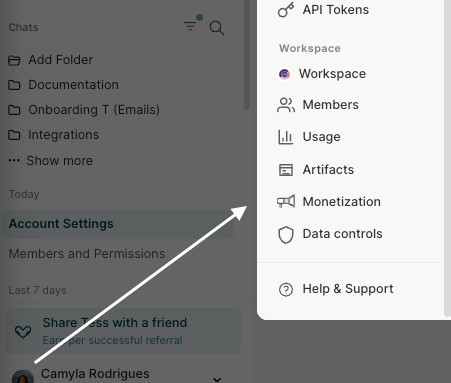
1. Click on your user icon
2. Click on settings
3. Locate Monetization in the Workspace area\\
 ### **Understanding your Revenue Sources**
When accessing the monetization area, you will find a detailed dashboard with your earnings organized by category:
* **Subscriptions:** Revenue generated from users who subscribe to your Workspace.
* **Agent Sales**: Earnings from the direct sale of your agents.
* **Executions (runs):** Accumulated value from the executions of your agents by other users.
Tess offers a complete dashboard so you can closely track the performance of your monetization strategies. Knowing how and where to view your earnings is essential to understand your performance and plan your next steps.
### **Understanding your Revenue Sources**
When accessing the monetization area, you will find a detailed dashboard with your earnings organized by category:
* **Subscriptions:** Revenue generated from users who subscribe to your Workspace.
* **Agent Sales**: Earnings from the direct sale of your agents.
* **Executions (runs):** Accumulated value from the executions of your agents by other users.
Tess offers a complete dashboard so you can closely track the performance of your monetization strategies. Knowing how and where to view your earnings is essential to understand your performance and plan your next steps.
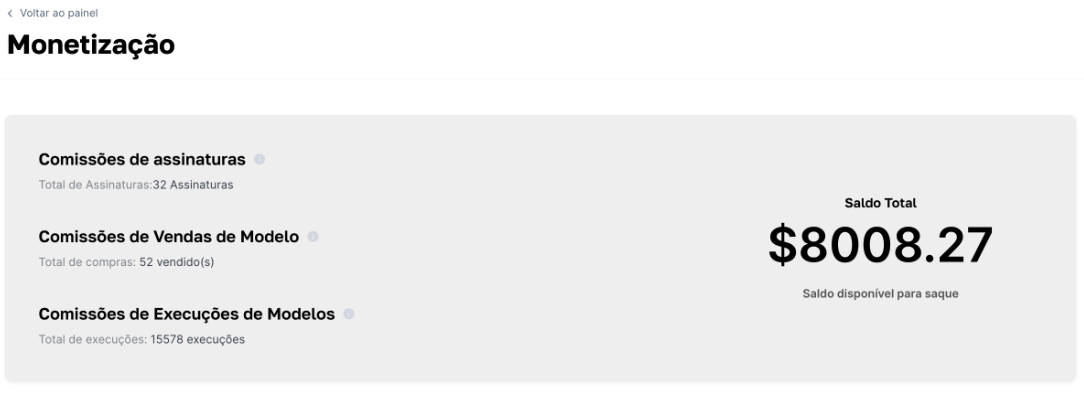 This dashboard provides a clear and consolidated view of your performance, allowing you to identify which strategies are delivering the best results.
### **Withdrawal Information**
To ensure the security and convenience of our creators, we have established some guidelines for withdrawing earnings.
This dashboard provides a clear and consolidated view of your performance, allowing you to identify which strategies are delivering the best results.
### **Withdrawal Information**
To ensure the security and convenience of our creators, we have established some guidelines for withdrawing earnings.
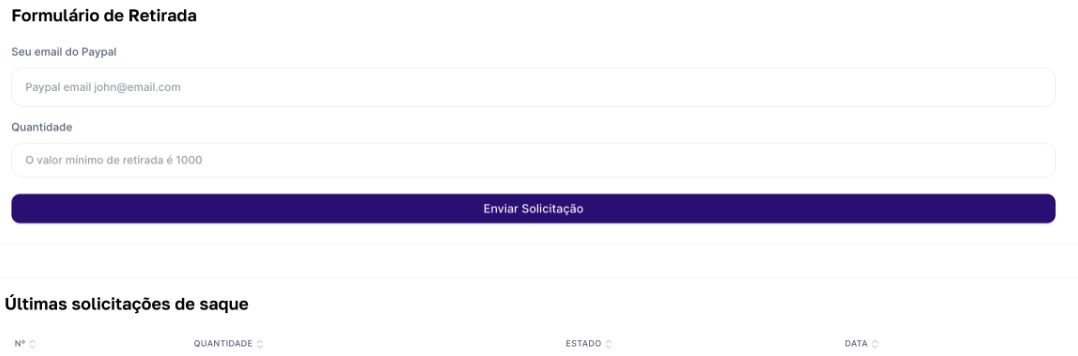 Withdrawal of funds will be available as soon as you reach a minimum balance of \$1,000.00 (one thousand dollars).
All monetization payments are processed exclusively via PayPal.
Monitoring your earnings regularly not only helps validate your strategies but also helps you plan when you will be able to make your next withdrawal.
If you have any questions, simply contact our support team via email: [support@tess.im](mailto:support@tess.im).
Withdrawal of funds will be available as soon as you reach a minimum balance of \$1,000.00 (one thousand dollars).
All monetization payments are processed exclusively via PayPal.
Monitoring your earnings regularly not only helps validate your strategies but also helps you plan when you will be able to make your next withdrawal.
If you have any questions, simply contact our support team via email: [support@tess.im](mailto:support@tess.im).