> ## Documentation Index
> Fetch the complete documentation index at: https://docs.tess.im/llms.txt
> Use this file to discover all available pages before exploring further.
# Music
Tess AI’s Music tool lets you create original songs from natural-language prompts. You describe genre, instruments, mood, structure, and duration — and the AI generates a track ready to use in videos, presentations, podcasts, bumpers, music prototypes, and social media content.
**What is the Music Generator**
It’s a “music studio” inside the chat:
* you describe what you want to hear
* you choose (when available) the music generation model
* you generate an original track
* you refine with new instructions until you reach the ideal result
You don’t need to know music theory, play an instrument, or use production software. The final quality depends mainly on how clear your prompt is.
### **Available models**
Tess AI may offer different music generation models, for example:
* Minimax Music
* Google Lyria
* Stability Music
* ElevenLabs Music
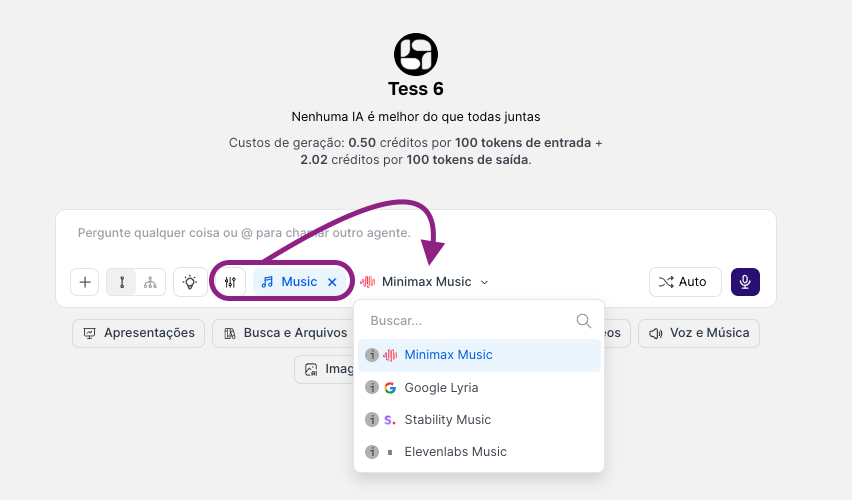 Each model tends to have a different “signature” (timbre, style, vocals, arrangement density, prompt responsiveness). To find the best sound for a project, it’s worth testing the same prompt in 2 models and comparing.
### **Use cases**
* Custom background tracks for videos and lives
* Bumpers and jingles (brand, product, campaign)
* Music for institutional presentations
* Prototypes of musical ideas (melody, groove, mood)
* Content for social media (short loops, specific moods)
### **How to use the tool**
Enable it in Tess Chat, choose one of the models, and write a prompt (simple model).
Use this formula:
*Genre + Instruments + Mood + Tempo/BPM + Duration + Structure references*
Examples:
* “Create a soft jazz instrumental with piano, bass, and drums, melancholic, 90 BPM, 60 seconds.”
* “Minimalist electronic track, synths and dry kick, futuristic atmosphere, 120 BPM, 30 seconds, with a short intro and a light drop.”
Once you get the result, keep asking for specific adjustments, for example:
* Structure: “Make a 5s intro, then a catchy chorus, and end with a fade-out.”
* Energy: “Make the chorus more energetic and the verse calmer.”
* Instrumentation: “Remove the sax and add clean guitar with reverb.”
* Mix: “Lower the drums and bring up the bass.”
* Harmony: “In C major” or “more tense, with minor chords.”
**Tips for better prompts**
* Be specific about the goal: “background music for a corporate video” vs “music for a party”
* Set duration and BPM (even if approximate)
* Say whether you want instrumental or vocals
* Indicate mood with concrete adjectives: “intimate, soft, cinematic, tense, triumphant”
* For social media, ask for a “loop” and an “ending that connects back to the beginning”
### **Prompt Examples for Music**
* Corporate “Modern corporate instrumental track, light piano and pads, inspiring and discreet, 100 BPM, 45 seconds, no vocals, ending with fade-out.”
* Podcast “Soft lo-fi ambient, light drums with hi-hats, smooth bass, welcoming mood, 80 BPM, 60 seconds, continuous loop, no attention-grabbing melodies.”
* Short bumper “8-second bumper, electronic pop, catchy hook, 128 BPM, ending with a short impact, no vocals.”
**Credits and usage**
Music generation usually consumes more credits than text responses, because it involves audio processing. To optimize, test first with 10–20 seconds and refine the prompt before generating long versions.
Take the opportunity to generate the audio you need, royalty-free, for your campaigns, projects, or other communications.
Each model tends to have a different “signature” (timbre, style, vocals, arrangement density, prompt responsiveness). To find the best sound for a project, it’s worth testing the same prompt in 2 models and comparing.
### **Use cases**
* Custom background tracks for videos and lives
* Bumpers and jingles (brand, product, campaign)
* Music for institutional presentations
* Prototypes of musical ideas (melody, groove, mood)
* Content for social media (short loops, specific moods)
### **How to use the tool**
Enable it in Tess Chat, choose one of the models, and write a prompt (simple model).
Use this formula:
*Genre + Instruments + Mood + Tempo/BPM + Duration + Structure references*
Examples:
* “Create a soft jazz instrumental with piano, bass, and drums, melancholic, 90 BPM, 60 seconds.”
* “Minimalist electronic track, synths and dry kick, futuristic atmosphere, 120 BPM, 30 seconds, with a short intro and a light drop.”
Once you get the result, keep asking for specific adjustments, for example:
* Structure: “Make a 5s intro, then a catchy chorus, and end with a fade-out.”
* Energy: “Make the chorus more energetic and the verse calmer.”
* Instrumentation: “Remove the sax and add clean guitar with reverb.”
* Mix: “Lower the drums and bring up the bass.”
* Harmony: “In C major” or “more tense, with minor chords.”
**Tips for better prompts**
* Be specific about the goal: “background music for a corporate video” vs “music for a party”
* Set duration and BPM (even if approximate)
* Say whether you want instrumental or vocals
* Indicate mood with concrete adjectives: “intimate, soft, cinematic, tense, triumphant”
* For social media, ask for a “loop” and an “ending that connects back to the beginning”
### **Prompt Examples for Music**
* Corporate “Modern corporate instrumental track, light piano and pads, inspiring and discreet, 100 BPM, 45 seconds, no vocals, ending with fade-out.”
* Podcast “Soft lo-fi ambient, light drums with hi-hats, smooth bass, welcoming mood, 80 BPM, 60 seconds, continuous loop, no attention-grabbing melodies.”
* Short bumper “8-second bumper, electronic pop, catchy hook, 128 BPM, ending with a short impact, no vocals.”
**Credits and usage**
Music generation usually consumes more credits than text responses, because it involves audio processing. To optimize, test first with 10–20 seconds and refine the prompt before generating long versions.
Take the opportunity to generate the audio you need, royalty-free, for your campaigns, projects, or other communications.