> ## Documentation Index
> Fetch the complete documentation index at: https://docs.tess.im/llms.txt
> Use this file to discover all available pages before exploring further.
# AI Step | Read PDF Selected Pages
This function allows you to extract text from specific pages of a PDF document. It’s useful to focus on particular sections of a document without having to process the entire file, saving time and resources.
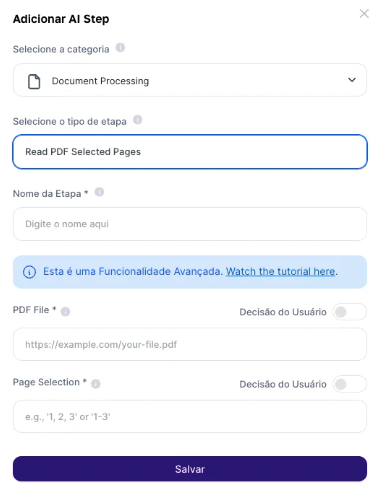 > **Fields to Fill In:**
>
> * Upload the file or PDF link: Provide a link to a publicly accessible PDF file. Alternatively, you can use the result of the "Upload File" user input to extract data from files stored on your computer.
> * Specify the Pages: Indicate which PDF pages you want to extract text from. You can enter a single page number, a range, or a comma-separated list.
>
> **Output Result:** The text from the specified pages will be extracted.
### **Use Cases:**
**1. Analysis of Specific Chapters:** Ideal for students and researchers who need to analyze specific chapters of academic books.
**2. Review of Legal Documents:** Allows lawyers to quickly review specific clauses in lengthy contracts.
**3. Compilation of Sector Information:** Makes it easier to collect information from certain sections of annual reports or technical documents for market analysis.
**Limitations:**
It’s important to keep in mind that training your AI based on PDF documents extracted through Tess AI has a size limitation.
Training cannot exceed 80,000 words. Therefore, make sure the selected PDF is within this limit. If you have a PDF with more than 80,000 words, consider splitting it into smaller parts or selecting only the most relevant sections.
### **Implementation Examples**
A user uploads a book PDF and specifies that only the pages from chapter 3 should be read to focus on a specific topic.
A lawyer uses a fixed link to a contract and extracts only the pages containing clauses of interest for quick review.
"Read PDF Selected Pages" is a valuable step in Tess AI to extract text from specific pages of PDF documents, enabling more targeted and efficient analysis of relevant information without needing to process entire documents.
> **Fields to Fill In:**
>
> * Upload the file or PDF link: Provide a link to a publicly accessible PDF file. Alternatively, you can use the result of the "Upload File" user input to extract data from files stored on your computer.
> * Specify the Pages: Indicate which PDF pages you want to extract text from. You can enter a single page number, a range, or a comma-separated list.
>
> **Output Result:** The text from the specified pages will be extracted.
### **Use Cases:**
**1. Analysis of Specific Chapters:** Ideal for students and researchers who need to analyze specific chapters of academic books.
**2. Review of Legal Documents:** Allows lawyers to quickly review specific clauses in lengthy contracts.
**3. Compilation of Sector Information:** Makes it easier to collect information from certain sections of annual reports or technical documents for market analysis.
**Limitations:**
It’s important to keep in mind that training your AI based on PDF documents extracted through Tess AI has a size limitation.
Training cannot exceed 80,000 words. Therefore, make sure the selected PDF is within this limit. If you have a PDF with more than 80,000 words, consider splitting it into smaller parts or selecting only the most relevant sections.
### **Implementation Examples**
A user uploads a book PDF and specifies that only the pages from chapter 3 should be read to focus on a specific topic.
A lawyer uses a fixed link to a contract and extracts only the pages containing clauses of interest for quick review.
"Read PDF Selected Pages" is a valuable step in Tess AI to extract text from specific pages of PDF documents, enabling more targeted and efficient analysis of relevant information without needing to process entire documents.