> ## Documentation Index
> Fetch the complete documentation index at: https://docs.tess.im/llms.txt
> Use this file to discover all available pages before exploring further.
# Podcast
The Podcast tool in Tess AI Chat will be your automated podcasting studio. It turns a script into a complete audio episode, with multiple voices, dialogues, and long duration — no microphone, no manual editing, and no audio software.
### **Where to find the Podcast Generator**
Inside Tess AI chat, just click the Tools button and choose the Podcast option:
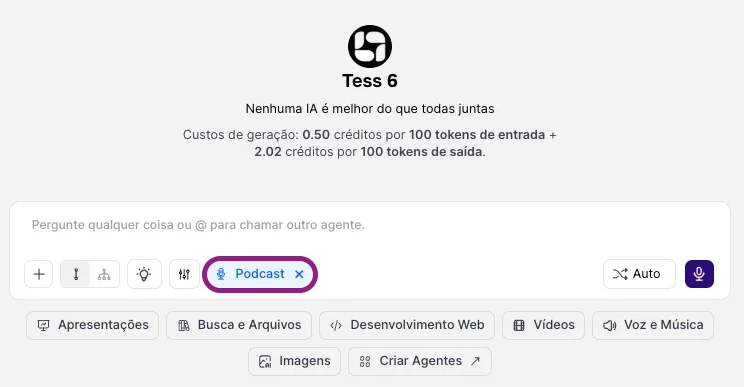 This is a tool powered by advanced audio technology models. It reads your script and:
* interprets who the characters are
* assigns different voices
* generates a single cohesive audio file, simulating a podcast show with multiple participants
* It goes far beyond simple voiceover: it creates the feeling of a conversation, interview, debate, or roundtable.
### **Key advantages**
You’re not limited to a few seconds. It’s possible to create substantial episodes (like 10 minutes or more) in a single run.
In practice, there isn’t a strict limit on characters. You can create a host + co-host, interviewer + interviewee, a panel with multiple experts. All in a single script.
The Podcast Generator supports multiple languages, allowing you to produce episodes for different audiences or even mix segments in different languages (for example, questions in Portuguese and answers in English).
### **How to use it and create your podcast**
The flow is simple: just enable the tool and start making requests, choose the voice, send the script, and generate the episode.
All the complex work of editing, mixing, and assembling voices is handled by the AI. In the end, you receive a ready-to-download audio file that you can publish on podcast platforms, social media, or your website.
This is a tool powered by advanced audio technology models. It reads your script and:
* interprets who the characters are
* assigns different voices
* generates a single cohesive audio file, simulating a podcast show with multiple participants
* It goes far beyond simple voiceover: it creates the feeling of a conversation, interview, debate, or roundtable.
### **Key advantages**
You’re not limited to a few seconds. It’s possible to create substantial episodes (like 10 minutes or more) in a single run.
In practice, there isn’t a strict limit on characters. You can create a host + co-host, interviewer + interviewee, a panel with multiple experts. All in a single script.
The Podcast Generator supports multiple languages, allowing you to produce episodes for different audiences or even mix segments in different languages (for example, questions in Portuguese and answers in English).
### **How to use it and create your podcast**
The flow is simple: just enable the tool and start making requests, choose the voice, send the script, and generate the episode.
All the complex work of editing, mixing, and assembling voices is handled by the AI. In the end, you receive a ready-to-download audio file that you can publish on podcast platforms, social media, or your website.
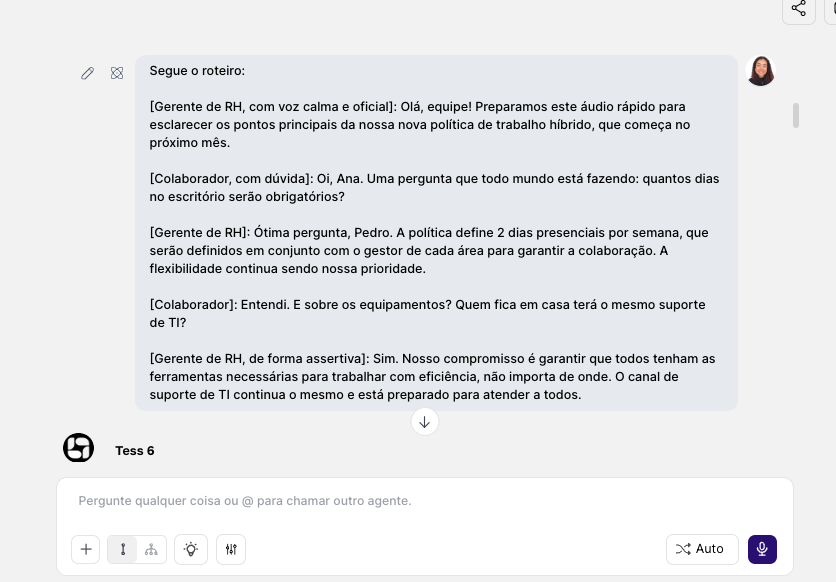
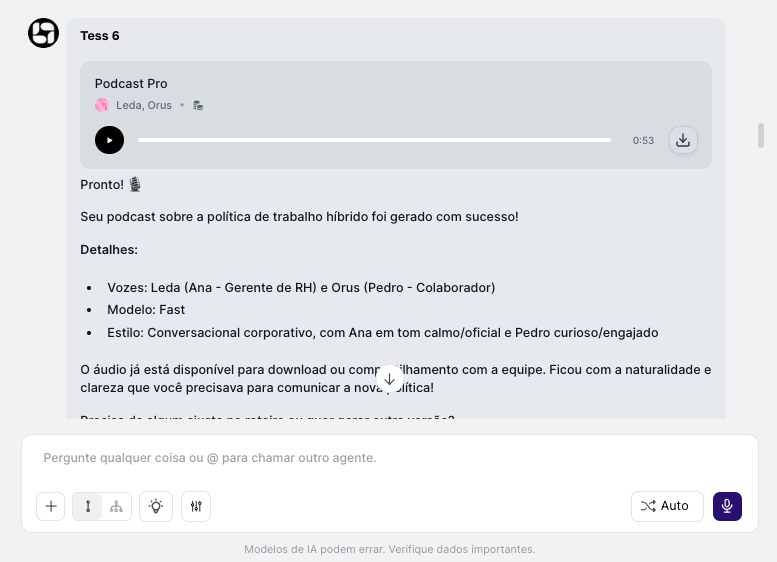 **Link to the generated Podcast:** [**Listen to the Podcast**](https://cdn.tess.im/assets/uploads/7b10767d-0096-4f72-8bd9-da747171ba98.mp3?_gl=1*1oowaa3*_gcl_au*MTY5NDY3MTc0MC4xNzY5NjkwMzQ2LjIwMDk3NDk3MjcuMTc3MDk5MDY5Ni4xNzcwOTkxMDA3*_ga*MTc0NDAwNTQ4Ny4xNzY5NjkwMzQ1*_ga_K1Q8FJY3BS*czE3NzA5OTA2OTUkbzQ5JGcxJHQxNzcwOTkxMDA3JGo2MCRsMCRoMA..*_ga_9D17W435GL*czE3NzA5OTA2OTUkbzM4JGcxJHQxNzcwOTkxMDA3JGo2MCRsMCRoMA..)
**Tips:**
1. **Clearly identify who is speaking**
Use a script format—this helps the AI separate lines, alternate voices, and keep a conversational rhythm:
\[Host]: Welcome to another episode of our podcast!
\[AI Specialist]: Thanks for the invitation, it’s a pleasure to be here.
2. **Mark emotions and intonation**
Give simple acting directions:
\[Host, in an excited tone]: Today’s news is simply incredible!
\[Interviewee, in a low and reflective voice]: I had never thought of it that way… \[pause]
### **When to use the Podcast Generator vs. Voiceover (Speech)**
* you want to simulate a conversation or multiple participants
* you need long episodes with a show-like dynamic
* you want a “show” experience (segments, debates)
* it’s just one voice reading a text (class, announcement, article)
* you want a simple and direct audio, without a podcast format
* you need short clips with a single voiceover
Tess AI’s Podcast Generator removes the technical barrier to creating a complete audio show. You focus on ideas and scripts; Tess handles voices, performance, and assembly into a single file ready for publishing.
It’s podcasting in accelerated mode: fast, scalable, and accessible for anyone or any team that wants to turn knowledge into audio content.
**Link to the generated Podcast:** [**Listen to the Podcast**](https://cdn.tess.im/assets/uploads/7b10767d-0096-4f72-8bd9-da747171ba98.mp3?_gl=1*1oowaa3*_gcl_au*MTY5NDY3MTc0MC4xNzY5NjkwMzQ2LjIwMDk3NDk3MjcuMTc3MDk5MDY5Ni4xNzcwOTkxMDA3*_ga*MTc0NDAwNTQ4Ny4xNzY5NjkwMzQ1*_ga_K1Q8FJY3BS*czE3NzA5OTA2OTUkbzQ5JGcxJHQxNzcwOTkxMDA3JGo2MCRsMCRoMA..*_ga_9D17W435GL*czE3NzA5OTA2OTUkbzM4JGcxJHQxNzcwOTkxMDA3JGo2MCRsMCRoMA..)
**Tips:**
1. **Clearly identify who is speaking**
Use a script format—this helps the AI separate lines, alternate voices, and keep a conversational rhythm:
\[Host]: Welcome to another episode of our podcast!
\[AI Specialist]: Thanks for the invitation, it’s a pleasure to be here.
2. **Mark emotions and intonation**
Give simple acting directions:
\[Host, in an excited tone]: Today’s news is simply incredible!
\[Interviewee, in a low and reflective voice]: I had never thought of it that way… \[pause]
### **When to use the Podcast Generator vs. Voiceover (Speech)**
* you want to simulate a conversation or multiple participants
* you need long episodes with a show-like dynamic
* you want a “show” experience (segments, debates)
* it’s just one voice reading a text (class, announcement, article)
* you want a simple and direct audio, without a podcast format
* you need short clips with a single voiceover
Tess AI’s Podcast Generator removes the technical barrier to creating a complete audio show. You focus on ideas and scripts; Tess handles voices, performance, and assembly into a single file ready for publishing.
It’s podcasting in accelerated mode: fast, scalable, and accessible for anyone or any team that wants to turn knowledge into audio content.