> ## Documentation Index
> Fetch the complete documentation index at: https://docs.tess.im/llms.txt
> Use this file to discover all available pages before exploring further.
# Shared Wallet
At Tess, we believe that artificial intelligence should be a collaborative tool. That’s why we created a model that allows you to use a single subscription to work with as many people as you want in the same workspace, sharing credits in a single wallet.
### What is the Shared Wallet?
The Shared Wallet is the feature that allows you to invite coworkers, friends, or even family members to your workspace at no extra cost per user. Instead of paying per "seat," your billing is based on the AI credits that the team actually consumes.
Tess works as an AI Marketplace: you have a fixed subscription (annual or monthly) and only pay for credit consumption, without worrying about the number of members. It is a pool of credits that can be shared among countless workspace members.
### How to Invite New Members to Your Workspace
Adding people to your workspace is a simple process.
Log in to your Tess AI account, click on your user menu (bottom left corner), and go to "Settings".
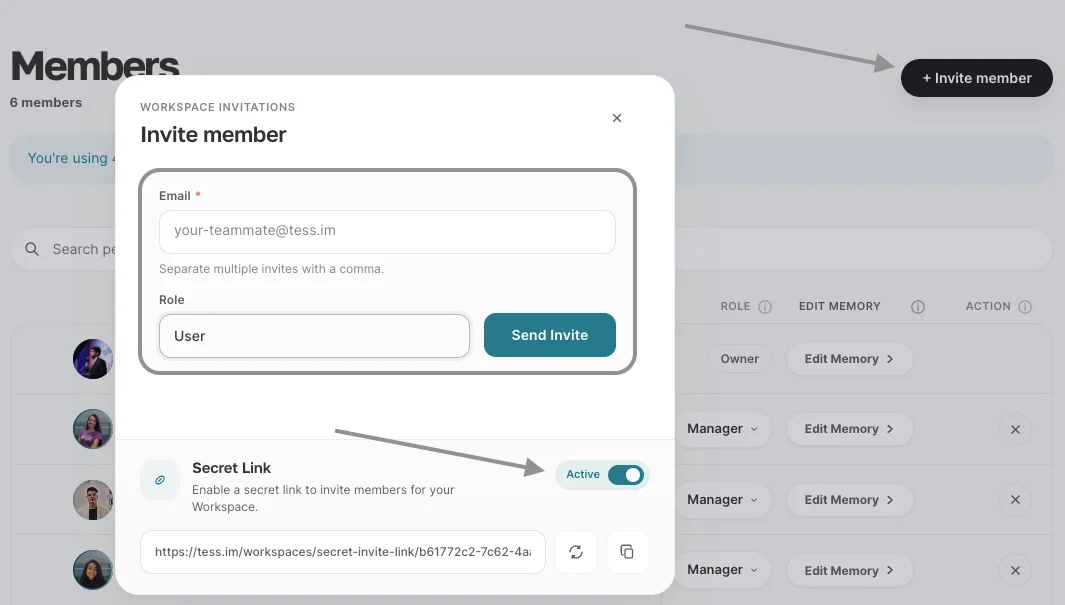 Within the settings, click on the "Members" tab.
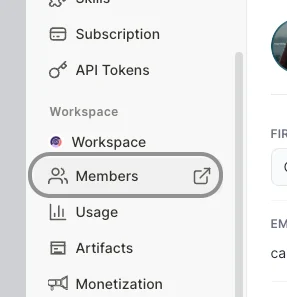 Click the "Add new member" button.
Enter the email address of the person you want to invite and send the invitation. Or, if you prefer, send it to more than one person with the same permission level using the secret link.
Click the "Add new member" button.
Enter the email address of the person you want to invite and send the invitation. Or, if you prefer, send it to more than one person with the same permission level using the secret link.
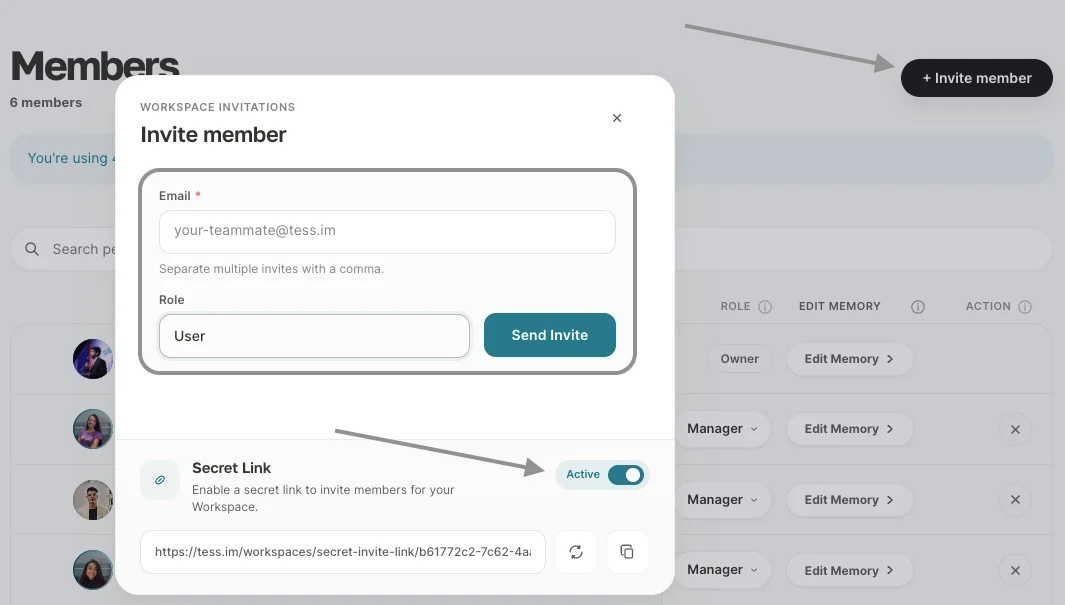 *The invited person will receive an email with an access link. Upon accepting and creating their account, they will become part of your workspace, using the same credit wallet as you.*
### Understanding Billing and Credit Usage
All credits in your plan, whether from the subscription or standalone packages, go into a single Wallet, which is shared by all workspace members.
*The invited person will receive an email with an access link. Upon accepting and creating their account, they will become part of your workspace, using the same credit wallet as you.*
### Understanding Billing and Credit Usage
All credits in your plan, whether from the subscription or standalone packages, go into a single Wallet, which is shared by all workspace members.
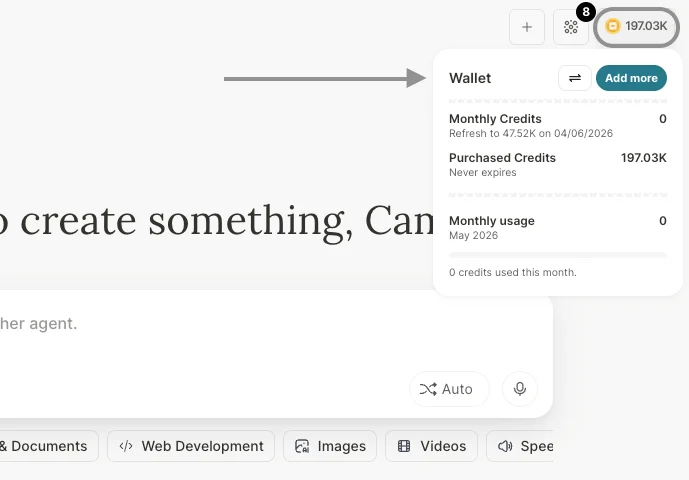 With each content generation or interaction with AI, a small amount of credits is deducted from the wallet, depending on the AI model used.
**Important Note about Legacy Plans**
For users on legacy plans (older subscription models such as **GO**, Beginner, Individual, and Business), the per-seat billing system may still apply. If you have one of these plans, check the specific conditions of your subscription or contact our support to migrate to one of the new plans. Even in these cases, we still offer features to invite additional users at no cost.
**Best Practices for Account Management**
> 1. Align expectations: Agree with your workspace members on how credits will be used (for work, study, testing, etc.).
> 2. Track consumption: If you are the account administrator, access the "Wallet" area periodically to understand usage pace and ensure credits meet the team’s needs.
> 3. Learn together: Use the Shared Wallet to encourage people around you to learn about artificial intelligence together with you.
At Tess, we believe AI should be collaborative. With the Shared Wallet, you can bring people around you into the same account, learn together, and take full advantage of the platform without barriers.
If you have any questions, our support team is available to help via email: [support@tess.im](mailto:support@tess.im).
With each content generation or interaction with AI, a small amount of credits is deducted from the wallet, depending on the AI model used.
**Important Note about Legacy Plans**
For users on legacy plans (older subscription models such as **GO**, Beginner, Individual, and Business), the per-seat billing system may still apply. If you have one of these plans, check the specific conditions of your subscription or contact our support to migrate to one of the new plans. Even in these cases, we still offer features to invite additional users at no cost.
**Best Practices for Account Management**
> 1. Align expectations: Agree with your workspace members on how credits will be used (for work, study, testing, etc.).
> 2. Track consumption: If you are the account administrator, access the "Wallet" area periodically to understand usage pace and ensure credits meet the team’s needs.
> 3. Learn together: Use the Shared Wallet to encourage people around you to learn about artificial intelligence together with you.
At Tess, we believe AI should be collaborative. With the Shared Wallet, you can bring people around you into the same account, learn together, and take full advantage of the platform without barriers.
If you have any questions, our support team is available to help via email: [support@tess.im](mailto:support@tess.im).