> ## Documentation Index
> Fetch the complete documentation index at: https://docs.tess.im/llms.txt
> Use this file to discover all available pages before exploring further.
# AI Step | Extract Text from TXT, XML, RSS, JSON
The Extract Text from TXT, XML, RSS, and JSON step converts structured or raw files into plain text, removing technical elements such as tags, keys, and syntax. With this, Tess transforms complex data into readable content ready for analysis by AI agents.
### What is the Step?
This step is part of the Document Processing category, responsible for cleaning and simplifying data from different formats.
In practice, it:
* Reads TXT, XML, RSS, and JSON files
* Removes:
* XML tags
* JSON structures (keys, arrays)
* RSS metadata
* Keeps only the relevant semantic content
* Delivers a clean block of text in the agent's context
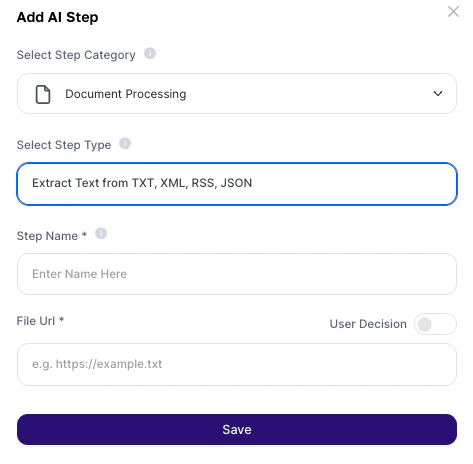
### Where to find it
1. Go to AI Studio
2. Click on Add AI Step
3. Select Document Processing
4. Choose Extract Text from TXT, XML, RSS, and JSON
 ***
## How to use?
### Configuration fields
| Field | Required | Description |
| :-------- | :------- | :----------------------------------------------------------------------------------------- |
| Step Name | Yes | Internal step name (alphanumeric characters only). Used to reference the output in prompts |
| File URL | Yes | Direct URL of the file (TXT, XML, RSS, or JSON) or input variable (e.g.: `{{json}}`) |
## About the Output
The result is a continuous block of plain text, without any original technical structure.
* Semantic content (names, descriptions, values)
* All text relevant for human reading
* XML tags (``)
* JSON structures (`{}`, `[]`)
* RSS metadata
* Technical syntax
Important:
The original structure (hierarchy, nesting) is lost — the content becomes linear.
## Deeper explanation
This step acts as a normalizer of technical data into natural language.
File (TXT / XML / RSS / JSON) → Step removes technical structure
↓
Clean text is generated → Agent interprets semantically
Note:
* The AI focuses on the content, not the structure
* Ideal for inputs that were not originally designed for human reading
## Practical examples
Prompt:\
"Summarize the main news of the day and identify relevant market trends."
Usage:
* RSS feed from news portals
* Agent generates automatic curation
Prompt:\
"Analyze the logs and identify the main contact reasons and customer sentiment."
Usage:
* Chat or support logs
* Automatic issue classification
Prompt:\
"Based on the extracted data, generate a personalized prospecting email for each lead."
Usage:
* JSON export from CRM
* AI transforms into a commercial action
Prompt:\
"Organize the extracted information and highlight the main indicators."
Usage:
* API responses
* Transform technical data into insights
Best practices
* Use direct file URLs: avoid links that open web pages (HTML)
* Combine with structured prompts: e.g., "extract name, role, and company"
* Be careful with structure loss: nested JSON may lose logical context
* Use the Step Name in the prompt: e.g., *"Based on the data from step *`dados_crm`*..."*
* Combine with other steps: Extract → analysis → save to Sheets/Drive
## Important notes
* The URL must be public and direct (no login required)
* Original hierarchical structure is lost
* The step does not preserve data formatting or organization
* Large files may impact the context window
Extract Text from TXT, XML, RSS, and JSON is the bridge between technical data and artificial intelligence. It enables transforming APIs, feeds, and structured files into usable information, unlocking analysis, automations, and content generation based on data that previously required manual processing.
***
## How to use?
### Configuration fields
| Field | Required | Description |
| :-------- | :------- | :----------------------------------------------------------------------------------------- |
| Step Name | Yes | Internal step name (alphanumeric characters only). Used to reference the output in prompts |
| File URL | Yes | Direct URL of the file (TXT, XML, RSS, or JSON) or input variable (e.g.: `{{json}}`) |
## About the Output
The result is a continuous block of plain text, without any original technical structure.
* Semantic content (names, descriptions, values)
* All text relevant for human reading
* XML tags (``)
* JSON structures (`{}`, `[]`)
* RSS metadata
* Technical syntax
Important:
The original structure (hierarchy, nesting) is lost — the content becomes linear.
## Deeper explanation
This step acts as a normalizer of technical data into natural language.
File (TXT / XML / RSS / JSON) → Step removes technical structure
↓
Clean text is generated → Agent interprets semantically
Note:
* The AI focuses on the content, not the structure
* Ideal for inputs that were not originally designed for human reading
## Practical examples
Prompt:\
"Summarize the main news of the day and identify relevant market trends."
Usage:
* RSS feed from news portals
* Agent generates automatic curation
Prompt:\
"Analyze the logs and identify the main contact reasons and customer sentiment."
Usage:
* Chat or support logs
* Automatic issue classification
Prompt:\
"Based on the extracted data, generate a personalized prospecting email for each lead."
Usage:
* JSON export from CRM
* AI transforms into a commercial action
Prompt:\
"Organize the extracted information and highlight the main indicators."
Usage:
* API responses
* Transform technical data into insights
Best practices
* Use direct file URLs: avoid links that open web pages (HTML)
* Combine with structured prompts: e.g., "extract name, role, and company"
* Be careful with structure loss: nested JSON may lose logical context
* Use the Step Name in the prompt: e.g., *"Based on the data from step *`dados_crm`*..."*
* Combine with other steps: Extract → analysis → save to Sheets/Drive
## Important notes
* The URL must be public and direct (no login required)
* Original hierarchical structure is lost
* The step does not preserve data formatting or organization
* Large files may impact the context window
Extract Text from TXT, XML, RSS, and JSON is the bridge between technical data and artificial intelligence. It enables transforming APIs, feeds, and structured files into usable information, unlocking analysis, automations, and content generation based on data that previously required manual processing.