> ## Documentation Index
> Fetch the complete documentation index at: https://docs.tess.im/llms.txt
> Use this file to discover all available pages before exploring further.
# AI Wallet
The Credit Wallet (AI Wallet) is the control center for your credits on Tess. It shows how much you still have available in your Workspace.
### **Where to find the Credit Wallet**
The Wallet is visible in the upper right corner of Tess on the chat screen, or image/video generators, next to a small yellow coin icon.
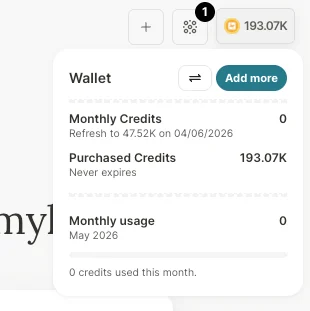
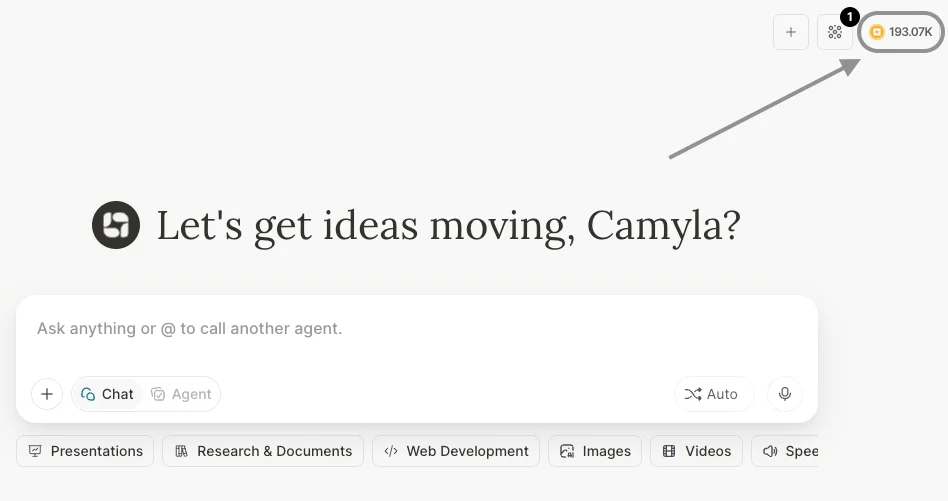 Here you can see, in real time, the available credit balance of the workspace (not per user, but at the general Workspace level).
Credits that have a monthly refill (and expire) are shown under Monthly Credits. Credits purchased separately fall under the "Purchased Credits" option.
Here you can see, in real time, the available credit balance of the workspace (not per user, but at the general Workspace level).
Credits that have a monthly refill (and expire) are shown under Monthly Credits. Credits purchased separately fall under the "Purchased Credits" option.
 ### **What are credits and how do they work**
Credits are the "currency" of Tess. Depending on the action you perform in Tess, it may have a cost and the consumption comes from this credit wallet, for example:
\
Sending messages is a form of consumption and depends on the size of the conversation and also on the chosen model. The more robust models tend to consume more credits per exchange compared to older ones, but they perform better on more complex tasks.
\
Activating Max Mode, by expanding the reach of the working context window, ends up sending the model much more previous content, in order to accommodate the entire history up to the maximum window of each model. More memory, more cost — which is why it is a feature that should be activated on demand.
\
When you attach files to the Knowledge Base, they also need to be processed and made available in your account's library. This document processing procedure deducts from your credits and is a one-time charge per document. However, the use of AI for token reading consumes resources.
\
The process of generating images, videos, avatars, music, narrations, and podcasts through the Tess chat are all done with AI and, for each of them, there is a specific cost tied to the process. In addition, the use of tools (Tools) such as Deep Analysis and Manage Files can also generate costs in your credit wallet.
### **Behind this are tokens:**
* **Input tokens:** everything you send to the AI and then what is sent as chat context
* **Output tokens:** everything the AI generates as a response
The cost in credits is calculated based on the number of tokens processed and the type of resource used.
The Credit Wallet, together with the Execution History, provides full transparency on how AI is being used in your workspace.
You pay for the credits consumed, with transparency and predictability — and you have the freedom to choose the model and configuration that makes the most sense for each task. To understand exactly where your credits are being used, Tess offers the Execution History.
For any questions, contact our team at: [support@tess.im](mailto:support@tess.im).
### **What are credits and how do they work**
Credits are the "currency" of Tess. Depending on the action you perform in Tess, it may have a cost and the consumption comes from this credit wallet, for example:
\
Sending messages is a form of consumption and depends on the size of the conversation and also on the chosen model. The more robust models tend to consume more credits per exchange compared to older ones, but they perform better on more complex tasks.
\
Activating Max Mode, by expanding the reach of the working context window, ends up sending the model much more previous content, in order to accommodate the entire history up to the maximum window of each model. More memory, more cost — which is why it is a feature that should be activated on demand.
\
When you attach files to the Knowledge Base, they also need to be processed and made available in your account's library. This document processing procedure deducts from your credits and is a one-time charge per document. However, the use of AI for token reading consumes resources.
\
The process of generating images, videos, avatars, music, narrations, and podcasts through the Tess chat are all done with AI and, for each of them, there is a specific cost tied to the process. In addition, the use of tools (Tools) such as Deep Analysis and Manage Files can also generate costs in your credit wallet.
### **Behind this are tokens:**
* **Input tokens:** everything you send to the AI and then what is sent as chat context
* **Output tokens:** everything the AI generates as a response
The cost in credits is calculated based on the number of tokens processed and the type of resource used.
The Credit Wallet, together with the Execution History, provides full transparency on how AI is being used in your workspace.
You pay for the credits consumed, with transparency and predictability — and you have the freedom to choose the model and configuration that makes the most sense for each task. To understand exactly where your credits are being used, Tess offers the Execution History.
For any questions, contact our team at: [support@tess.im](mailto:support@tess.im).