> ## Documentation Index
> Fetch the complete documentation index at: https://docs.tess.im/llms.txt
> Use this file to discover all available pages before exploring further.
# Workspace ID
The **Workspace ID** is the unique identifier of your workspace on Tess. It is required in **every call to the Tess API**, including integrations made with N8n, Zapier, Make, Power Automate, HTML/JavaScript code, or any other tool that sends HTTP requests.
This identifier is sent in the `x-workspace-id` header and indicates which workspace the request is coming from. In practice, it defines **where the execution credits will be consumed from**.
The Workspace Id does not work as a filter, you can find any public agent in the API that is available on Tess and that is in other Workspaces.
### What is it?
Every Tess user is linked to one or more **workspaces**: spaces where agents, automations, members, and credits are organized.
The **Workspace ID** is the numeric code that uniquely identifies each of these environments.
Every time you make a call to the Tess API — whether directly through code or through an integration platform — send the Workspace ID in the `x-workspace-id` header.
Tess uses this value to identify:
* The workspace of origin of the request;
* The workspace associated with the API Key used;
* The workspace from which the execution credits will be deducted.
**Important:**
The `x-workspace-id` **does not limit which agents can be executed**. You can run public agents from other workspaces, as long as you have access to them. In that case, the call still originates from your workspace and the credits are consumed from it.
## Where to find it
To locate the Workspace ID of the current environment:
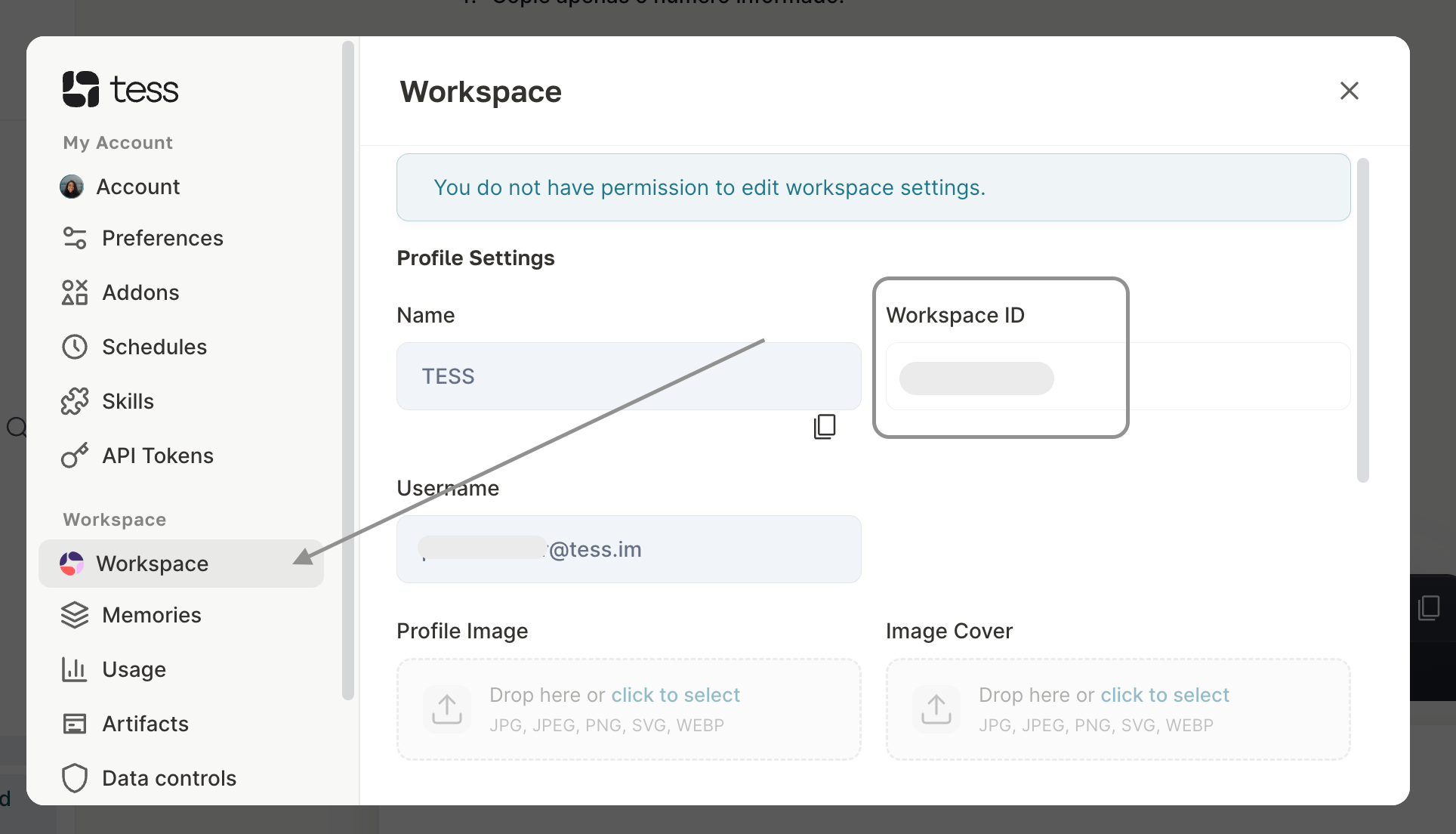
1. In Tess, open **Settings**.
2. Click on **Workspace**.
3. Locate the **Workspace ID** field.
4. Copy only the number shown.
This is the recommended method, as it avoids confusion when you have access to more than one workspace.
 There is an alternative option, identifying it via URL, but attention is needed to avoid any errors:
* Look at the browser's address bar and locate the `w=` parameter. The number right after this parameter is the Workspace ID.
There is an alternative option, identifying it via URL, but attention is needed to avoid any errors:
* Look at the browser's address bar and locate the `w=` parameter. The number right after this parameter is the Workspace ID.
**Example:**
```text theme={null}
https://app.tess.im/... ?w=12345
```
When using the URL, confirm that you are browsing in the correct workspace before copying the value.
This value is always the value of the **workspace you are accessing**, regardless of whether the executed agent is yours or belongs to a third party. But if you have access to more than one, analyze from where the API request will originate and use it in the parameter.
## Applying it in the API
Include the Workspace ID in the `x-workspace-id` header in **every request sent to the Tess API**.
In addition to it, also include your API Key in the `Authorization` header.
```text theme={null}
Authorization: Bearer YOUR_API_KEY
x-workspace-id: 12345
```
## This applies to calls made from:
* Your own code, such as HTML, JavaScript, Python, or other languages;
* API testing tools, such as Postman or Insomnia;
* Automation platforms, such as **N8n, Zapier, Make**, and Power Automate;
* Internal systems, CRMs, backends, and custom integrations.
In integration platforms, manually configure these values in the **Headers** section of the HTTP request module or step.
Then, send the remaining call parameters, such as the `agent_id` and the `prompt` that will be processed by the agent.
## Best practices
* Include the `x-workspace-id` in every request to the Tess API.
* Prioritize checking **Settings > Workspace** to copy the correct ID.
* Copy only the Workspace ID number, without spaces or extra characters.
* Always use the Workspace ID associated with the API Key configured in the integration.
* In automations with multiple agents, keep the same `x-workspace-id` when the calls originate from the same workspace.
* Store the API Key in environment variables, credential vaults, or secure fields of the integration platform.
* Never share your API Key in prompts, messages, public repositories, or screenshots.
Important note
In any integration with the Tess API, send the x-workspace-id along with your API Key. This header identifies the workspace of origin of the call and ensures that credits are counted correctly — whether in your own code, in N8n, Zapier, Make, or another automation tool.