

Important:Rewards are manually verified by our team. To validate correctly, the emails used on the platforms (e.g., G2 and Gartner) must be the same as the ones used in your Tess account.
Where to find it (how to access)?
Click the user icon in the bottom-left corner of Tess and then on Rewards: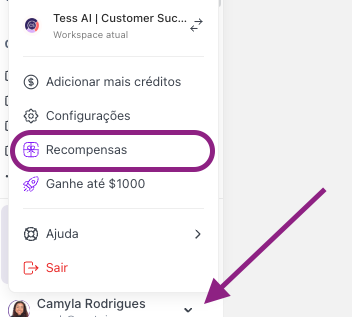
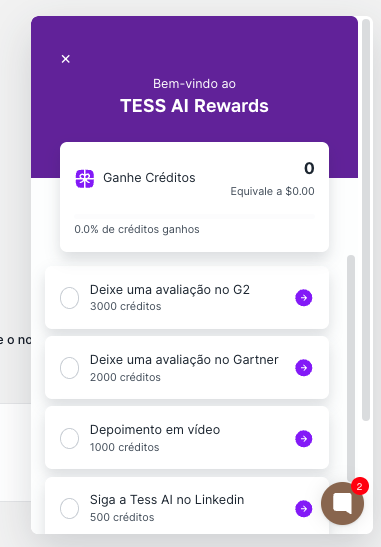
- Leave a review on G2: 3,000 credits
- Leave a review on Gartner: 2,000 credits
- Video testimonial: 1,000 credits
- Follow Tess AI on LinkedIn: 500 credits
- Follow Tess AI on Instagram: 500 credits
- Follow Rica on LinkedIn: 500 credits
- Follow Rica on Instagram: 500 credits
Maximum EarningsYou can earn up to 8,000 credits (equivalent to $42.55) by completing all available actions.
What can prevent validation?
- Different emails between Tess and the platform (main cause)
- Review not published (e.g., left as a draft)
- Attempt to earn credits by repeating the same action
- Signs of abuse/fraud (may lead to loss of the reward and actions on the account)
What to do if you don’t receive it?
Send an email to our support team at support@tess.im and attach proof for validation:
- confirmation of your Tess email
- link to your profile/review (when there is a public link)
- screenshot showing the completed action
- for videos: file link or the format indicated on the page itself