

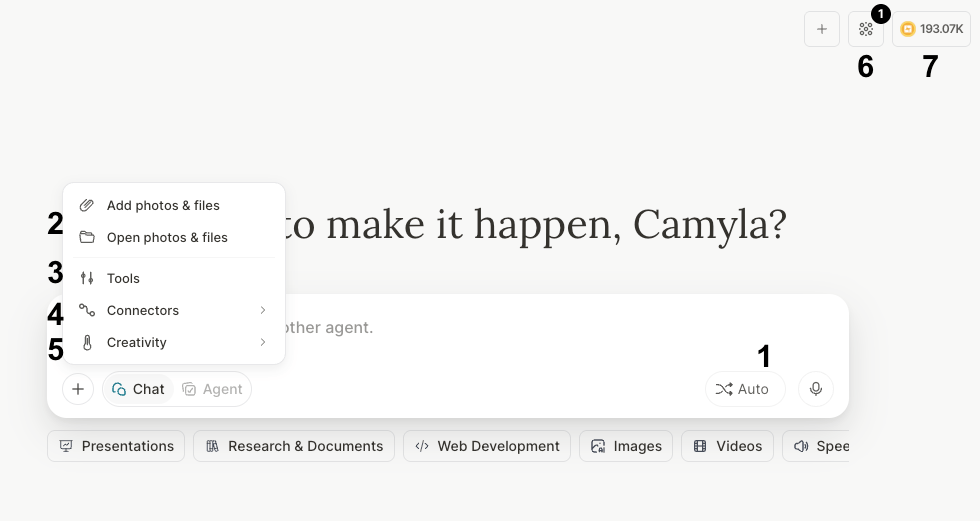
- Select the LLM: Choose the ideal AI model for each task or leave it in Automatic mode so Tess can decide for you. Models are grouped in the picker (by provider/family) so you can scan faster — for example Gemini Flash, Claude Sonnet, Nemotron, and media tools stay easier to find.
Screenshot placeholder — model picker groups: Capture the LLM selector open with grouped sections visible (provider/family headers + a few models under each).
- Add Knowledge Base: Feed the AI with your documents and official content to ensure the answers are accurate and aligned with your company.
- Enable Tools (Tools): Allow the AI to execute actions, such as searching for information on the internet, analyzing data, creating documents, generating images or videos, or interacting with other apps.
- Integrate Connectors: This function creates a more operational layer for chats and agents; with it, your work goes beyond just conversational and starts triggering actions in external spaces such as platforms you use daily.
- Adjust the Temperature: Control the level of creativity in the responses. Lower values (systematic, objective) generate more direct and factual answers, while higher values (creative, imaginative) allow more freedom and creativity. This matters to reduce the risk of hallucinations.
- Use Memory Collections: Organize and activate sets of information to create your memories and help personalize responses and keep consistency over time.
- AI Wallet: Track your credit balance in real time.