

Where to find it?
- Open the chat you want to share
- In the upper right corner, click on the sharing icon
- Choose the type of link: Clone Chat or Public Chat (Replay)
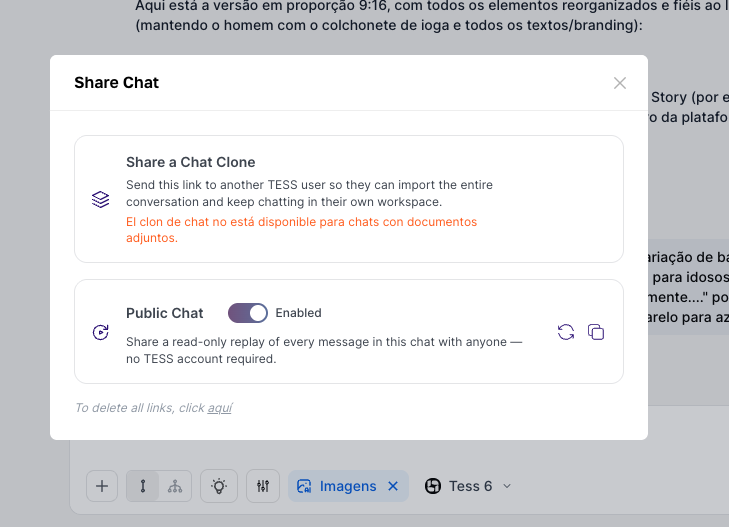
Sharing options
Clone Chat (collaborative link)
A link is generated that allows another person to open a copy of the chat and continue the conversation from where you left off. They will see all of your previous exchanges.Use it when you want collaboration on projects and need to pass the context built so far to someone to continue from their own screen. Or if you have made an internal demonstration of a flow (e.g.: prompt, service structure, script) and the result can be reused by another user on Tess.In short, the person can continue the chat and generate new messages based on the existing history without interfering with your screen or adapting it to their own context (without “reinventing” everything).In this case, you will need to exclude the files from the knowledge base!
Public Chat (Replay) (view-only link)
A public link is created that works as a “replay” of the conversation (showing the entire exchange in an animated way). Anyone with the link can view the interaction, even without a Tess AI account.Use it to share a result with an external audience (e.g.: insight, tutorial, agent example), to show how Tess arrived at an output (process transparency), or even to send to a client/partner as a conversation reference (without giving editing access).People will only be able to view the conversation (like a replay), so you do not need to log in to Tess to open the link, you do not need to exclude the files from the base.
Relevant use case examples:
- For Sales: it is a practical way to share real Tess use cases (with the execution and the result), without needing to record a video or redo the step-by-step process.
- For Marketing: it is possible to share use cases in social media posts and take the audience directly to the experience, via link, in a quick and hands-on way.