

Think of it this way:
- Agent = the professional (who decides and leads)
- Skill = the process (how to execute a task the right way)
What is a Skill
A Skill is, in practice, an isolated folder with a main instruction file (by default, something like skill.md) , plus other auxiliary files relevant to that competency (templates, images, scripts, code, assets, examples, etc.). In other words, that folder works as a “complete kit” for a task.Why Skills exist (and why that matters)
Eficiência e redução de custo (revelação progressiva)
A common problem when “training” agents is putting everything in context: dozens of pages of instructions to cover all tasks. This, consequently, increases cost; confuses the agent; increases the risk of hallucination and can even worsen performance on specific tasks.With Skills, the agent only needs to “read what’s necessary, when it’s necessary”. Even if you have multiple skills available, it will fetch only the ones that will be relevant to the task at hand.It’s the best of both worlds: the agent has all the necessary potential to brilliantly perform countless tasks, but it only actually uses what’s needed for each one. This improves cost and performance because it reduces tokens consumed unnecessarily and avoids putting everything into context all the time
Esse mecanismo é baseado em revelação progressiva
First, a short “label/metadata” is read to understand whether the Skill makes sense. If so, the agent reads the rest and accesses the Skill’s full files.
Especialização real, sem criar 5 agentes diferentes
Without skills, it’s common for you to need multiple agents (accounts payable, P&L, analysis, etc.). With skills, you keep the same agent and give it specific procedures per task. The agent becomes a “genius employee” who knows where to find the right procedure.
Reuso entre agentes
If you have multiple agents and there is a “common” part among them (e.g., response standard, checklist, template, execution routine), you can turn that into a Skill and reuse it across all of them.
Where and how Skills work
At the moment, Skills are available in Agent Computer, because in this mode we work with a “virtual machine” structure and folders, which makes it possible to navigate files, read instructions, execute scripts, and access assets consistently. A Skill usually follows this concept:- Isolated folder: Each Skill is a separate “little box”: its own context, its own files, its own rules.
- Instruction file (skill.md): It is the heart of the Skill: it explains the objective, the step-by-step, and how to use the files contained in the folder.
- Artifacts (support files): It can include images (logos, references), templates, scripts and code (e.g., Python), examples and patterns, or any file useful to accomplish the task
How to import Skills into Tess
You can import Skills from different repositories, either directly from GitHub or by adding the file in your Skill management area: You paste the repository link in Tess’s skills area (Settings > My account > Skils)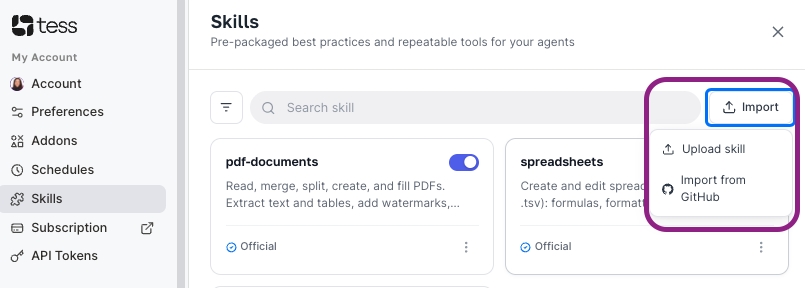
Tess downloads the structure (folders + files) and in a few seconds, the Skill will be available.
Can Skills run code?
Yes. A Skill can include scripts (e.g., Python) and execution instructions. This allows the agent to:- execute repetitive tasks
- process data
- generate reports
- automate routines
Practical note: execution usually happens via code execution resources in agent mode and/or via the file management/execution tool (depending on the flow).