

Where to find it?
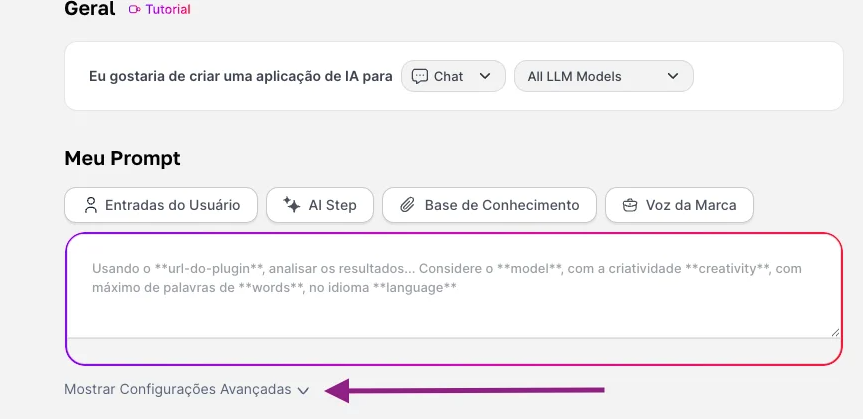
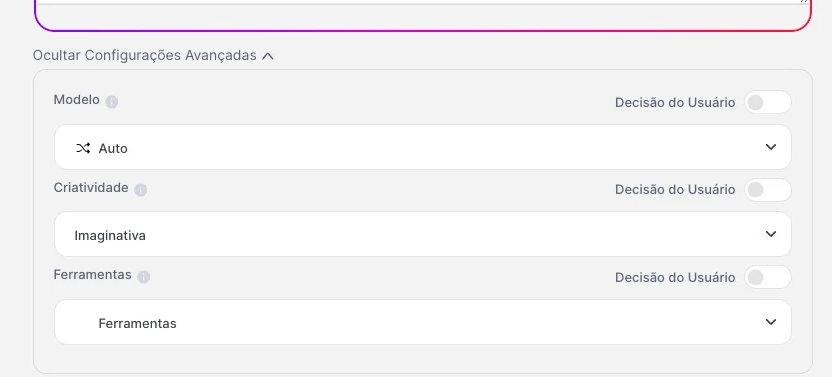
The Advanced Settings section is on the agent’s settings screen and brings together the advanced configurations, where you pre-define:- which LLM it should use (or whether it can use more than one)
- which tools (Tools) it should trigger as a rule
- which temperature range/response style will be used
Why it matters
Control
Control
Less creative and more analytical agents, for example in financial, legal, or compliance areas, need less “creativity” and more control.
Security
Security
You limit which tools the agent can call (e.g., allow or block Internet, integrations, etc.).
Standardization
Standardization
Everyone who uses that agent will have the same behavior, regardless of who is in the chat. A perfect feature for creating agents that will be used by many people.
What does it influence?
Standardizing a model
If you choose a specific model for the agent’s operation, the end user won’t be able to switch it, and all interaction will be done with that defined model. For this reason, we disable the user’s choice and lock in this model.This process can be done when a specific model has been identified as the best performer for the agent’s activity, and to avoid changes and inconsistent deliveries, you can set it and everyone who uses the agent will also be interacting with the same model.
Standardizing the temperature
In general, temperature can influence the LLM’s creativity. So if your agent leans more toward financial or legal use, for example, you can opt for a lower temperature, keeping creativity controlled.If your agent leans toward a more creative bias, such as in marketing, brainstorming, or content areas, you can opt for a higher temperature, allowing more creative freedom from the LLMs.
Standardizing tools (tools)
If your agent is specific and exclusive for analyses, you can leave Deep Analysis active, for example. But remember, when you define a tool, no other will be activated during the conversation.

You can combine all three settings, or choose just one to standardize!