

What is the Code Generator?
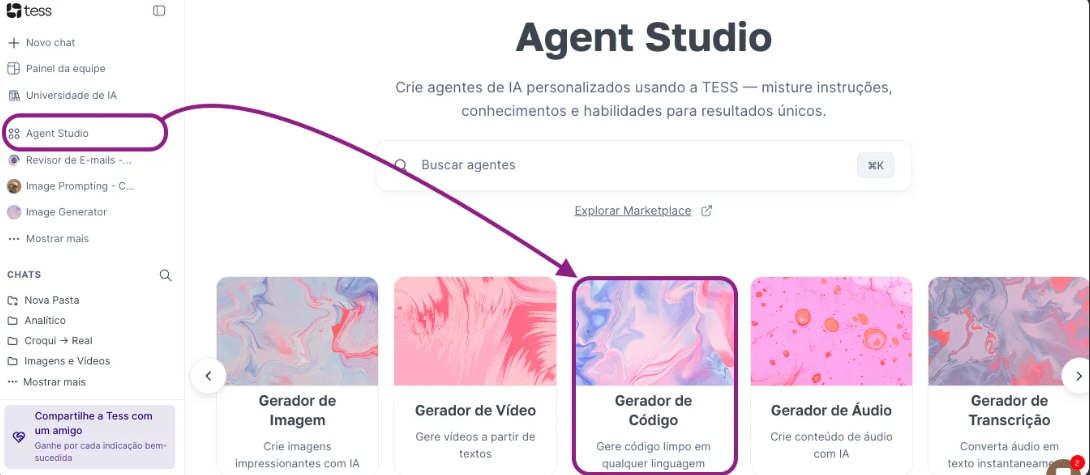
The Code Generator is an interactive chat environment, powered by an Artificial Intelligence specialized in programming. Located in the Agent Studio tab under Code Generator, this generator is pre-trained to understand, generate, and debug code in virtually all existing programming languages.Whether you’re an experienced developer looking to optimize your time or a beginner taking your first steps, this tool offers smart support to turn your ideas into working code.
Develop Scripts and Applications
Develop Scripts and Applications
Describe what you need, and the AI will generate the initial code. For example: “Create a Python script that reads a CSV file and calculates the average of a specific column.”
Fix Bugs (Debugging)
Fix Bugs (Debugging)
Found an error you can’t solve? Paste the problematic code snippet and ask the AI to identify and fix the issue.
Translate / Review Code
Translate / Review Code
Easily migrate a function or script from one language to another. For example, ask it to “translate this Java code to JavaScript.”
Learn and Study
Learn and Study
Ask the AI to explain a concept, a function, or a complex block of code. It’s a great way to deepen your knowledge.
Be Specific
The clearer and more detailed your request is, the more accurate the generated code will be. Specify the language, the libraries you plan to use, and the final goal.
Provide Context
When asking to fix an error, include not only the code, but also the error message you’re getting.
Interact and Refine
The chat is a dynamic environment. Use it to refine the generated code. Ask it to add comments, simplify a function, or optimize performance.