

How does the Affiliate Program work?
The model is simple and beneficial for everyone. For every referral you make that converts into a new customer, everyone wins.For the person you refer
The person who subscribes to Tess AI using your exclusive affiliate link gets a 10% discount at the time of purchase, applied to the plan they choose.
For you (the affiliate)
You receive a 10% commission on the amount your referral pays during the first 12 months of their subscription.
Important Commission Details
Duration
The 10% commission is recurring on payments made by the customer during the first 12 months of the contract.
Commission Cap
There is currently a total commission cap of up to $1,000 (one thousand dollars) per customer you refer.
Practical Example of Earning Potential
Imagine you referred Tess AI to a company, and they purchased a plan with 10 licenses (seats) at a cost of $40 per license/month.Annual contract value: 10 seats x $40 x 12 months = $4,800 Your commission (10%): $480 With a single referral, you would earn $480.
How to Join: Step-by-Step Guide
To generate your link and start referring, the process is very quick:Click to share Tess
Click the “Share Tess with a Friend” button (in the side menu) or, after clicking your user icon, look for the “Earn up to $1000” option.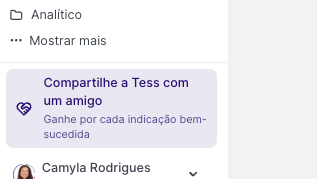
Tracking Your Results and Payments
You have full transparency to track the performance of your referrals.Results Monitoring
Results Monitoring
Within the same affiliate program page, click the “Rewards” tab or your dashboard. There, you’ll be able to see the status of your referrals and your accumulated earnings.
Update Timeframe
Update Timeframe
It’s important to note that a new sale can take, on average, 20 days to appear in your dashboard. This period is necessary to complete all financial and confirmation steps.
How to Receive Commissions
How to Receive Commissions
Payments are made via PayPal. To receive them, just add your PayPal account in the program’s payment settings area. If you don’t have an account yet, you can create one for free on the PayPal website.
- The PayPal account email registered on the affiliate platform is incorrect or doesn’t exist.
- The PayPal account hasn’t been fully verified.
- There is a restriction or block on the PayPal account that prevents receiving funds.
How to fix itIf you prefer, you can also contact our payments partner’s support directly by email: support@cello.so. Or, if you have any questions about the Affiliate Program, our team is available to help by email: support@tess.im.
- Review your details: Make sure the PayPal email registered in the affiliate dashboard is correct.
- Check your PayPal account: Log in to your PayPal account and confirm there are no pending verification steps or account restrictions. If you have questions, contact PayPal support.
- Update the information: After fixing any pending issue, update or re-enter your payment email in the affiliate dashboard. A new payment attempt will be made automatically in the next cycle.