

What is the Step?
This step is part of the Document Processing category, responsible for cleaning and simplifying data from different formats. In practice, it:- Reads TXT, XML, RSS, and JSON files
- Removes:
- XML tags
- JSON structures (keys, arrays)
- RSS metadata
- Keeps only the relevant semantic content
- Delivers a clean block of text in the agent’s context
Where to find it
- Go to AI Studio
- Click on Add AI Step
- Select Document Processing
- Choose Extract Text from TXT, XML, RSS, and JSON
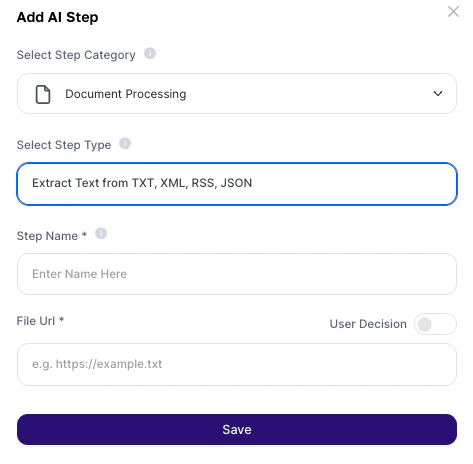
How to use?
Configuration fields
About the Output
The result is a continuous block of plain text, without any original technical structure.What is kept:
- Semantic content (names, descriptions, values)
- All text relevant for human reading
What is removed:
- XML tags (
<tag>) - JSON structures (
{},[]) - RSS metadata
- Technical syntax
Deeper explanation
This step acts as a normalizer of technical data into natural language.Flow
File (TXT / XML / RSS / JSON) → Step removes technical structure↓Clean text is generated → Agent interprets semantically
Note:
- The AI focuses on the content, not the structure
- Ideal for inputs that were not originally designed for human reading
Practical examples
Automated news monitoring (RSS)
Automated news monitoring (RSS)
Prompt:
“Summarize the main news of the day and identify relevant market trends.”Usage:
“Summarize the main news of the day and identify relevant market trends.”Usage:
- RSS feed from news portals
- Agent generates automatic curation
Support log analysis (TXT)
Support log analysis (TXT)
Prompt:
“Analyze the logs and identify the main contact reasons and customer sentiment.”Usage:
“Analyze the logs and identify the main contact reasons and customer sentiment.”Usage:
- Chat or support logs
- Automatic issue classification
CRM integration (JSON)
CRM integration (JSON)
Prompt:
“Based on the extracted data, generate a personalized prospecting email for each lead.”Usage:
“Based on the extracted data, generate a personalized prospecting email for each lead.”Usage:
- JSON export from CRM
- AI transforms into a commercial action
API and technical data processing
API and technical data processing
Prompt:
“Organize the extracted information and highlight the main indicators.”Usage:
“Organize the extracted information and highlight the main indicators.”Usage:
- API responses
- Transform technical data into insights
Important notes
- The URL must be public and direct (no login required)
- Original hierarchical structure is lost
- The step does not preserve data formatting or organization
- Large files may impact the context window