

What is the Step?
Media Converter acts as a universal media converter, integrated into the agent workflow. In practice, it:- Receives an audio or video file via URL or from a previous step
- Converts it to a new format
- Returns a URL of the converted file
This enables automating multimedia processes without relying on external tools.
Where to find it
- Go to AI Studio
- Click on Add AI Step
- Select Document Processing
- Choose Media Converter
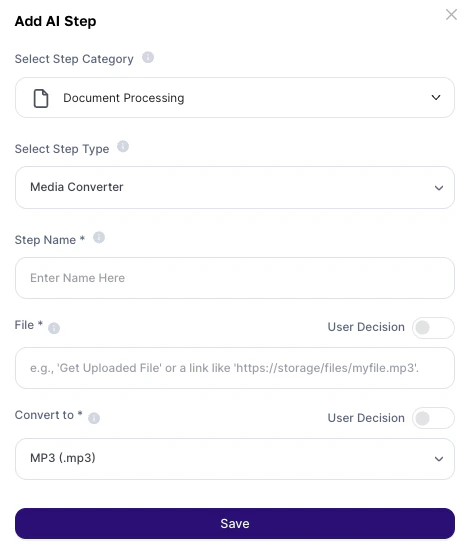
How to use?
Configuration fields
Supported formats
Audio
.mp3.wav.aac.flac.ogg.wma.m4a.opusVideo
.mp4.avi.mkv.mov.wmv.flv.webm.mpeg.3gp.ogv.m4vAbout the Output
The result is:- A direct URL of the converted file
- Preserved content (same audio/video, new format)
- Ready for: download; sharing and/or use in other steps
Deeper explanation
This step works as a media transformation stage within the workflow.Flow
Original file (audio/video) → Format conversion↓New URL generated → Used in next steps
It does not analyze content — it only transforms the format.
Practical examples
Multimedia campaign standardization
Multimedia campaign standardization
- Receive videos in
.movor.mkv - Convert to
.mp4 - Ensure compatibility with social platforms
Audio extraction from videos
Audio extraction from videos
- Convert
.mp4→.mp3 - Use for:
- transcription
- internal podcasts
- training
Client delivery optimization
Client delivery optimization
- Convert
.avi→.mp4 - Reduce size and improve compatibility
Automated content pipeline
Automated content pipeline
Example flow:Video → Media Converter → MP3 → Transcription → Text
Recorded meeting processing
Recorded meeting processing
- Extract audio
- Generate automatic summaries with AI
Important notes
- The step does not analyze content, it only converts
- The URL must be public and accessible
- Large files may impact processing time
- Conversion quality may vary slightly depending on the format