

Enabling the Internet Tool
Open the chat and click the Tools icon in the message box, enable the internet option, and then see which engine you want to use at that moment.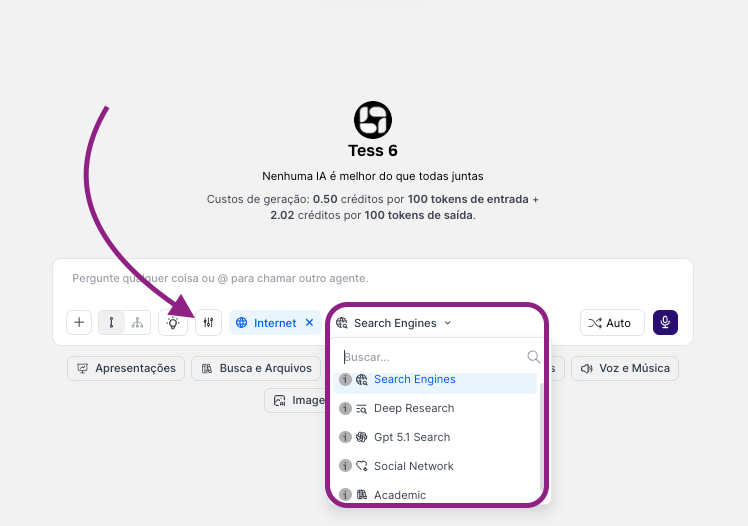
Search Engine (Search Engine)
It’s the standard web search tool, similar to using Google or Bing inside Tess. It runs a direct search based on your command and returns information from the first results.When to use
- Direct, factual questions
- Recent news and current events
- Quick lookups when you want an objective answer
- “What was yesterday’s game result between Team A and Team B?”
- “What’s the dollar exchange rate today?”
- “Summarize today’s main news in Brazil.”
- “What are the swimwear market trends for year X”
Deep Research (Deep Research)
It’s like having a dedicated research assistant. Instead of a quick search, the AI, Deep Research consults multiple sources, compares information, organizes and synthesizes different pieces of content, and delivers a more robust report.When to use
- To research and understand complex topics in depth
- When preparing reports, analyses, and strategic documents
- When you want different perspectives on the same subject
- “Do deep research on the impacts of artificial intelligence on the job market, broken down by sector.”
- “Build a report on Company X’s main competitors, focusing on products, positioning, and recent marketing strategies.”
GPT Search (Search with GPT)
It’s GPT’s own search engine, similar to Search Engine, but it uses GPT’s feature (which accesses Bing). Here it also searches, consolidates, and produces a cohesive answer.
Social Network (Social Networks)
A tool that focuses the search on public information from social media profiles (such as X/Twitter, LinkedIn, Instagram, etc.). Social network search tools can’t access private profiles.When to use
- To find biography information about individuals
- Publicly available social media information about companies
- “What are the relevant publicly available details about Company X on LinkedIn”
- “How many posts, followers, and what is the bio of profile X on Instagram”
Academic (Academic)
It’s the academic research tool that prioritizes searching for scientific articles and peer-reviewed papers in databases like Google Scholar and similar sources.When to use
- Academic work, theses, scientific articles
- Projects that require evidence and formal references
- When you need to cite studies, statistics, or systematic reviews
- “Find academic articles about the effects of meditation on reducing anxiety.”
- “What is the most recent research on using graphene in batteries?”