

What it is
The integration features a super-powerful action called Replace Content Using LLM. In practice, the agent:- Accesses the URL of the provided presentation.
- Analyzes the existing text on all slides.
- Processes a prompt (guideline) defining the new theme or context.
- Overwrites the old text with the new content generated by the AI, keeping the original design and text boxes intact.
Golden Rule of Steps
Remember: This step runs BEFORE the interaction with the user.This means the presentation will already be altered before the chat begins. To work perfectly, the URL and Prompt must come from previous User Inputs, from an activated User Decision key, or be pre-configured in the step.
Where to find it
- Go to AI Studio.
- Click on Add AI Step.
- In Select Step Category, select App Integration.
- In Choose an App, choose Google Slides.
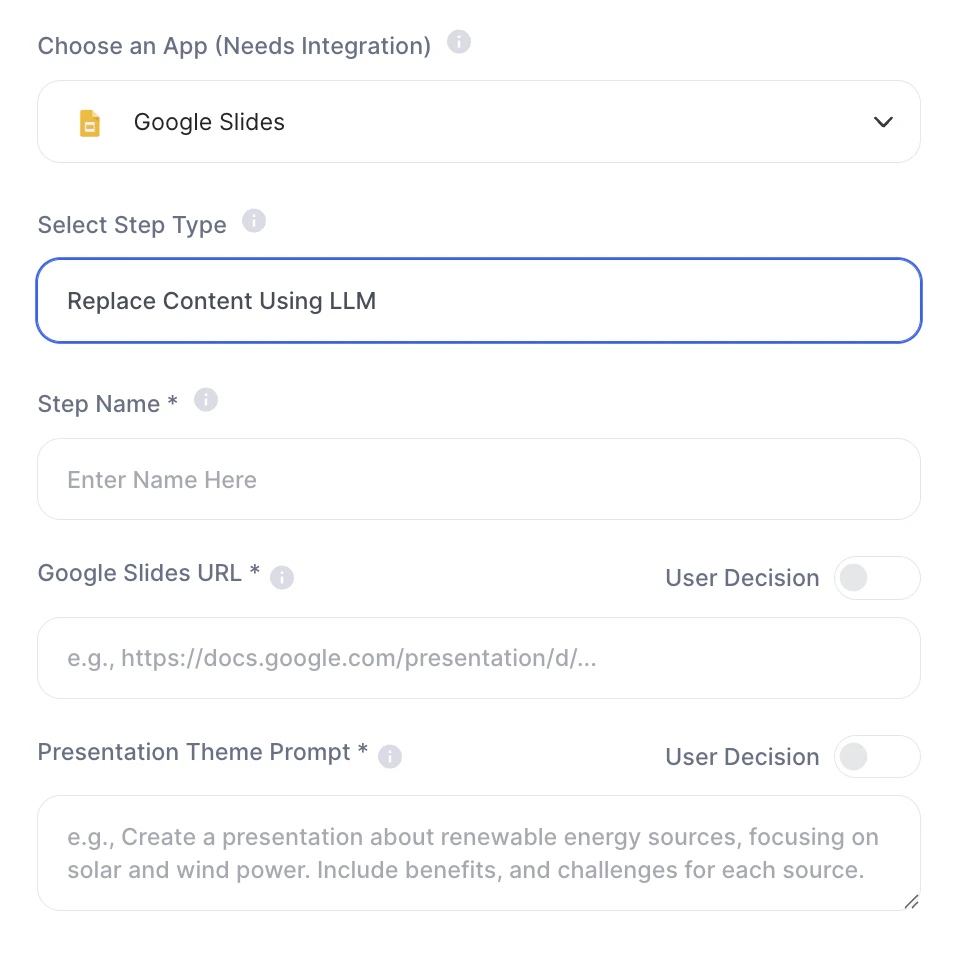
- In Select Step Type, choose Replace Content Using LLM.
How to use (Quickstart)
To configure the smart replacement, you will need to fill in the following fields:- Step Name: Internal name of your step (e.g.,
Adapt Pitch Deck). - Google Slides URL: The full link of the presentation that will be modified (e.g.,
https://docs.google.com/presentation/d/...). - Presentation Theme Prompt: The command that will guide the AI in the rewrite. This is where the brain of the operation lies.
- Example: “Rewrite this presentation about renewable energy focusing 100% on solar energy for the state of Minas Gerais. Include local economic benefits.”
Design vs. Text
It is fundamental to understand how Tess manipulates the slides:- What it DOES: Replaces titles, bullet points, and paragraphs by structuring the new message in the same space.
- What it DOES NOT DO: Does not create new slides from scratch, does not delete slides, does not alter background images, colors, fonts, or the design structure.
Practical examples
Use Case 1: Commercial Proposal Machine- Previous action: Your system (e.g., Make/N8N) duplicates a generic “Sales Template” and generates a new URL for a specific client.
- The Step: The Tess agent takes this new URL, receives the Inputs for company name and sector, and applies them in the Presentation Theme Prompt field:
"Rewrite this pitch deck adapting the language for the {{Setor_do_Cliente}} sector and mention the company {{Nome_da_Empresa}} in the value propositions." - Result: The sales representative receives a 100% personalized deck ready to send, with zero manual effort.
- The Step: You provide the URL of a “Time Management” training that was made for the IT department.
- The Prompt:
"Rewrite all practical examples and tips from this presentation so they apply to the reality of a Customer Success team that handles daily tickets."
Important notes
- Authentication: Your Google account must be integrated into your Workspace settings in Tess AI.
- Edit Permission: The authenticated email in Tess needs to have Editor permission on the provided Google Slides URL, otherwise the step will fail.
- Credit Consumption: Reading an entire presentation and formulating a rewrite consumes a considerable amount of the LLM’s context (tokens), impacting the credit balance. Caution is recommended with slides containing dozens of pages full of raw text.